Updateready
Downloading
Progress
Cached
Your web application needs to determine if updated files are currently being downloaded from the server hosting the application. You add the following code to your application:
Window.applicationCache.addeventlistener("EVENT",
Function(e) {
Alert("New or updated file Downloading");
},
False);
Which event should you use to detect that a download of a new or updated file from the server is occurring? (Substitute the word "EVENT" with the appropriate word.)
Choose the correct answer
Explanation
You should use the Progress event because it indicates that new or updated files are in the process of being downloaded.
The Downloading event fires when new files are detected when they are available, but does not indicate that the download has actually started.
Updateready is used to detect the new files have been downloaded to cache and are available for the application. Updateready does not indicate that new or updated files are being downloaded.
Cached does not indicate that new or updated files are being downloaded. Cached indicates that the application is now cached for future use.
Objective:
Manage the Application Life Cycle
SubObjective:
Manage the state of an application.
References
W3C
W3C
Copyright Year: 2012
HTML5: Edition for Web Authors
Click here for more information
You are designing an HTML 5 application that needs to implement an online bookstore, allowing users to have multiple shopping baskets, one per browser window. Baskets may be turned into orders individually, potentially with separate shipping and payment information per order. The requests may be submitted in parallel from different browsers on the same client PC.
You need to determine what data storage to use.
Which option should you choose?
Choose the correct answer
Explanation
To manage transactional type requests, you need to use a form of storage that is discrete for each session - that can be provided by using the SessionStorage option. With the SessionStorage option, even connecting to the same top-level browsing context provides a unique browsing experience. Connections from different sessions to the same page do not affect each other, which makes this option ideal for transactional requests.
Cookies and LocalStorage are more persistent across browser sessions and provide one storage option for each origin, which makes them unusable for multiple sessions to the same location having transactional integrity. Also, cookies may only carry 4 Kb of data, which will not be enough for a shopping basket.
IndexedDB cannot support secure transactional type requests to the web site, even if it can support transactional integrity. Personal information and monetary transactions should never be stored in a local indexed database, as this is not a good security practice.
Objective:
Manage the Application Life Cycle
SubObjective:
Manage the state of an application.
References
MSDN
Microsoft
Copyright Year: 2012
Saving files locally using Web Storage
Click here for more information
W3C
W3C
Copyright Year: 2012
Web Storage
Click here for more information
MSDN
Microsoft
Copyright Year: 2012
Introduction to Web Storage
Click here for more information
You are designing an HTML5 application that needs to support revisits to a web site where a user can work with a Microsoft Office document or other downloaded file type.
Each file may be up to a couple of megabytes in size and needs to persist in a storage location so that it is accessible to all browser windows on the same client PC.
You need to determine what data storage to use.
Which option should you choose?
Choose the correct answer
Explanation
You should use LocalStorage to allow a user to revisit a web site and work with a Microsoft Office document or other downloaded file type. LocalStorage is accessible to all browser windows on the same client PC and, because it provides a persistent location per domain for up to 10 MB of user data, it makes it perfect as a location for the storage of Office Documents whilst in edit.
Cookies and SessionStorage are not appropriate in this scenario because each supports only key/value pairs within the storage and not actual files. In addition to these data storage type not being suitable for files, they are also restricted to a maximum capacity of 4KB, which is clearly not enough to store office documents.
IndexedDB is primarily used for storing key value pairs for a session and would not generally be used to storage Binary large object (BLOB) data, such as a working file.
Objective:
Manage the Application Life Cycle
SubObjective:
Manage the state of an application.
References
MSDN
Microsoft
Copyright Year: 2012
Introduction to Web Storage
Click here for more information
W3C
W3C
Copyright Year: 2012
Web Storage
Click here for more information
MSDN
Microsoft
Copyright Year: 2012
Saving files locally using web storage
Click here for more information
You need to store a value of "Hello World" in a sessionStorage key called "Greeting" in your application. There are a number of ways to accomplish this task.
Which line of code will NOT store the value correctly?
Choose the correct answer
Explanation
sessionStorage.setItem('Greeting') = "Hello World"; calls setItem, but does not provide a key value pair. Instead, it tries to assign a value to a key, but is syntactically incorrect.
The following lines of code are syntactically equivalent and work correctly:
sessionStorage.setItem('Greeting', 'Hello World');
sessionStorage['Greeting'] = 'Hello World';
sessionStorage.Greeting= ''Hello World'';
sessionStorage.setItem('Greeting', 'Hello World'); sets a key/value pair by calling setItem.
sessionStorage['Greeting'] = 'Hello World'; uses array syntax to find the key in the collection.
sessionStorage.Greeting= ''Hello World''; uses property name syntax to set an expanded property.
Objective:
Manage the Application Life Cycle
SubObjective:
Manage the state of an application.
References
MSDN
Microsoft
Copyright Year: 2012
setItem method
Click here for more information
W3C
W3C
Copyright Year: 2012
Web Storage
Click here for more information
MSDN
Microsoft
Copyright Year: 2012
HTMLStorage object
Click here for more information
Which Touch gesture on Windows Phone 7 is used to simulate a traditional right-click operation with a mouse?
Choose the correct answer
Explanation
Touch and hold is typically when a single finger is placed within the screen area and held there for a pre-defined period of time. Generally the touch and hold gesture represents a traditional right click mouse operation.
The Tap gesture is a single finger tap and release to the screen area and typically signifies a selection operation similar to a left mouse click.
Double tapping is a zoom state gesture and will cause a zoomed in application to zoom out and a zoomed out application to zoom in. Zoom state is defined by the application, so the actual implementation is also controlled by the application.
The concept of a flick gesture is similar to a click and drag but less defined giving more flexibility to the application to scroll the window or move an object.
Objective:
Manage the Application Life Cycle
SubObjective:
Debug and test an HTML5-based touch-enabled application.
References
MSDN
Microsoft
Copyright Year: 2012
Navigation, Orientation and Gestures for Windows Phone
Click here for more information
Microsoft.com
Microsoft.com
Copyright Year: 2012
Using touch gestures
Click here for more information
While debugging an HTML5 touch-enabled application using the Visual Studio touch screen simulator, you need to test the swipe behavior of an object on the screen.
Which simulator interaction mode should you use to simulate a swipe gesture?
Choose the correct answer
Explanation
The Visual Studio simulator for metro apps provides an environment where apps can be designed, tested, and debugged. The simulator provides multiple options for touch simulation, such as in this case, where the swipe gesture is to be tested. Single finger touch would be the mode used and a right click and hold action can produce the drag and swipe behavior.
The simulator can also support pinch and zoom operations as well as object rotation. This is in addition to simulating classic mouse behavior.
Objective:
Manage the Application Life Cycle
SubObjective:
Debug and test an HTML5-based touch-enabled application.
References
MSDN
Microsoft
Copyright Year: 2012
Running Windows metro style apps in the simulator
Click here for more information
Which Touch gesture on Windows Phone 7 is used to move or reorder objects on the screen?
Choose the correct answer
Explanation
The Pan gesture has two typical behaviors. Content will stick to and follow the movement of the finger in any direction supported by the application. Items can be reordered by dragging and dropping items into a new location and making use of the Snap capability to place the object in its closest state when the finger is lifted from the screen.
The Tap gesture is similar to a left mouse click where finger down provides the touch indication and releasing the finger executes the action.
DoubleTap is surprisingly not like the double-click mouse action, but is used to control the zoom state. The application defines the zoom state and, based on its determination of the zoom state on a double tap, it will zoom in or out accordingly.
A flick gesture moves content from one area to another area. The controls or the application can be configured to support flicking in horizontal, vertical, or other directions.
Stretch will expand an area or zoom into a page or image, but does not move the item around the screen.
Objective:
Manage the Application Life Cycle
SubObjective:
Debug and test an HTML5-based touch-enabled application.
References
MSDN
Microsoft
Copyright Year: 2012
Navigation, Orientation, and Gestures for Windows Phone
Click here for more information
Microsoft.com
Microsoft.com
Copyright Year: 2012
Using touch gestures
Click here for more information
MSDN
Microsoft
Copyright Year: 2012
Touch hardware and Windows 8
Click here for more information
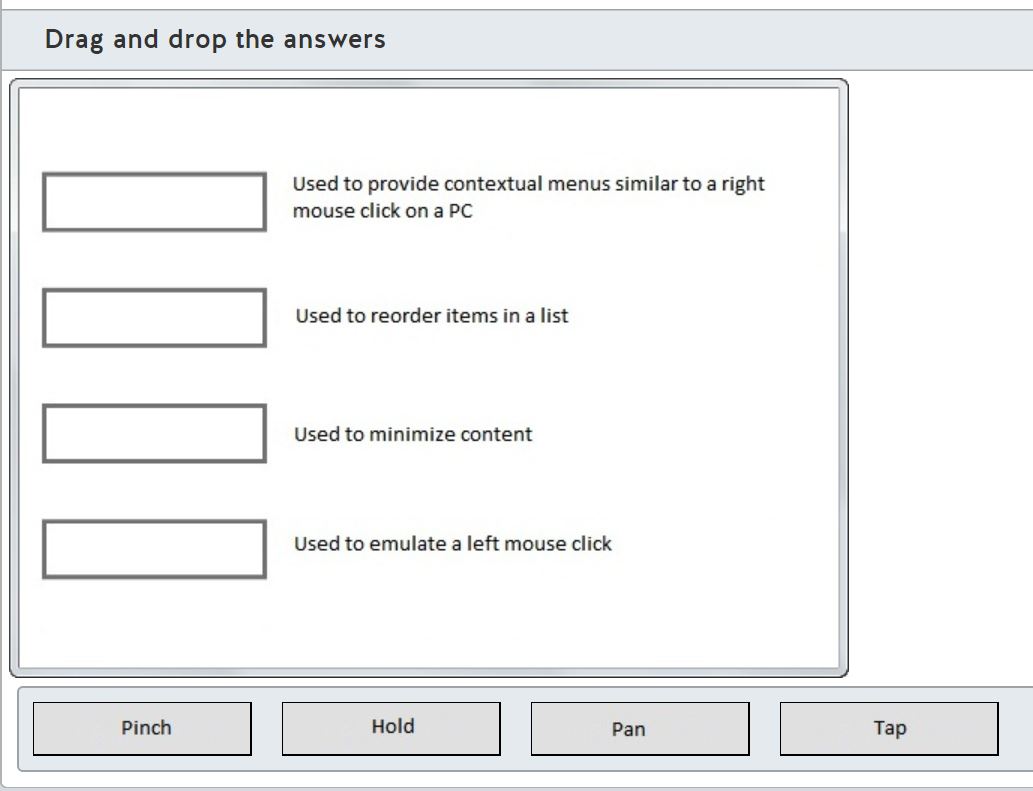
Match each touch gesture with the correct description for that gesture in the exhibit.
Drag and drop the answers




Explanation
Hold is used to simulate a right mouse click on a PC and can bring up context menus or other menu driven selections.
The Pan gesture has two typical behaviors. Content will stick to and follow the movement of the finger in any direction supported by the application. Items can be reordered by dragging and dropping items into a new location by using the Snap capability to place the object in its closest state when the finger is lifted from the screen.
The Pinch gesture minimizes content.
The Tap gesture is a single, brief touch on the screen within a bounded area and back up off the screen again. It is similar to a left mouse click where finger down provides the touch indication and releasing the finger executes the action.
Objective:
Manage the Application Life Cycle
SubObjective:
Debug and test an HTML5-based touch-enabled application.
References
MSDN
Microsoft
Copyright Year: 2012
Navigation, Orientation, and Gestures for Windows Phone
Click here for more information
What is the recommended size of a touch target on a Windows 7 phone application?
Choose the correct answer
Explanation
It is recommended that a touch target to support the majority of tasks be equal to or greater than 9 mm square. If screen real estate is limited, then a 7 mm target is acceptable as long as the width of the target is much larger. 9 mm was determined optimal by hundreds of hours of user testing, and represents the lowest average error rate. A 9 mm minimum touch target size can limit the error rate to as little as 1.6 percent.
The minimum touch target size is 7 mm but should be used as infrequently as possible and then only for controls that are wide enough (15mm minimum).
Objective:
Manage the Application Life Cycle
SubObjective:
Debug and test an HTML5-based touch-enabled application.
References
MSDN
Microsoft
Copyright Year: 2012
Interactions and Usability for Windows Phone
Click here for more information
Which three buttons are provided as standard on all Windows Phones and do not require development to include in your application? (Choose three.)
Choose the correct answers
Explanation
The three buttons provided as standard on all Windows Phones are the Back, Start, and Search buttons. None of these functions need to be provided within an application with the exception of a contextual search button. An example of the latter would be an email or contacts search option.
The standard buttons are provided to ensure a consistent user and developer experience. Deviating from these selections can lead to a confusing user experience, so you should avoid doing this when possible.
Objective:
Manage the Application Life Cycle
SubObjective:
Debug and test an HTML5-based touch-enabled application.
References
MSDN
Microsoft
Copyright Year: 2012
Interactions and Usability for Windows Phone
Click here for more information
Which three statements are true regarding a Windows Marketplace Application Submission? (Choose three.)
Choose the correct answers
Explanation
You must supply an application name and, because it is the first thing a customer will see about your app, a good name will attract users.
The package upload control must also be defined and consists of the path to the application's finished packages.
The third compulsory item in the list is the copyright and trademark information, which is a required addition to the application description.
There is no requirement to document the features of the application in the submission although it would be good practice to do so.
Likewise, hardware requirements are not compulsory but again, it would be a good practice to include such information, especially if the app is resource hungry.
Objective:
Manage the Application Life Cycle
SubObjective:
Publish an application to a store.
References
MSDN
Microsoft
Copyright Year: 2012
Application Submission Requirements
Click here for more information
When registering for a Windows Store Developer account there are two valid account types from which to choose.
Which two account types can you use? (Choose two.)
Choose the correct answers
Explanation
When you register for a Windows Store Developer account, the only two valid types of accounts are Company and Individual.
There are no types such as Student or Non-profit organization.
Objective:
Manage the Application Life Cycle
SubObjective:
Publish an application to a store.
References
MSDN
Microsoft
Copyright Year: 2012
Registering for a Windows Store Developer Account
Click here for more information
If your published application has more than one package, for example an application that supports more than one processor type, three elements of the application manifest file must be identical. One of them is Package\Capabilities.
What are the other two? (Choose two.)
Choose the correct answers
Explanation
When publishing an application to support more than one processor type you must have three identical elements within the application manifest file. These are:
* Package\Capabilities to define the protected resources to which the app needs access (such as Internet or music libraries)
* Package\Dependencies, which is used to declare other packages on which the app depends
* Package\Resources, which defines the languages used by the application and must have at least one entry.
Package\Properties\Framework defines a package as a framework and as such cannot be submitted to the store because Frameworks can be dependencies but not apps in their own right.
Package\Identity\@Publisher is a required element for all submissions but would not be the same for an application that supports multiple processors because this element defines the supported processor and can have only one unique value.
Package\Properties\Displayname is the reserved name for the application and again, while a required property, it does not have to be identical for all packages within the same application.
Objective:
Manage the Application Life Cycle
SubObjective:
Publish an application to a store.
References
MSDN
Microsoft
Copyright Year: 2012
Package Details
Click here for more information
MSDN
Microsoft
Copyright Year: 2012
App Submission Checklist
Click here for more information
What is the maximum package size for a published Windows Store application?
Choose the correct answer
Explanation
Application packages have two strict guidelines, one is the Block map hashes property that must be set to a SHA2-256 algorithm and the second is the maximum package size. The maximum package size for a submitted application package is 2 GB (2048 MB).
Objective:
Manage the Application Life Cycle
SubObjective:
Publish an application to a store.
References
MSDN
Microsoft
Copyright Year: 2012
Package Format Requirements
Click here for more information
Which two services can be added to your Windows Store application as advanced features? (Choose two.)
Choose the correct answers
Explanation
As a part of the submission process, you can select a name for your application and add advanced features to the app. The reason this is done after the naming process is because the Windows Store uses that name to identify the app to which to send updates.
The supported additions are Live Connect Services and Windows Push Notification Services. Live Connect Services include SkyDrive, Hotmail, and Messenger as well as single sign on support for multiple additional apps. Windows Push Notification Services provide support for application tile updates.
VPN connections, SMS Messaging, and Geolocation services are all features that could be developed and included in an app, but they are not included as the available advanced features when publishing your application.
Objective:
Manage the Application Life Cycle
SubObjective:
Publish an application to a store.
References
MSDN
Microsoft
Copyright Year: 2012
Adding advanced features to your app
Click here for more information
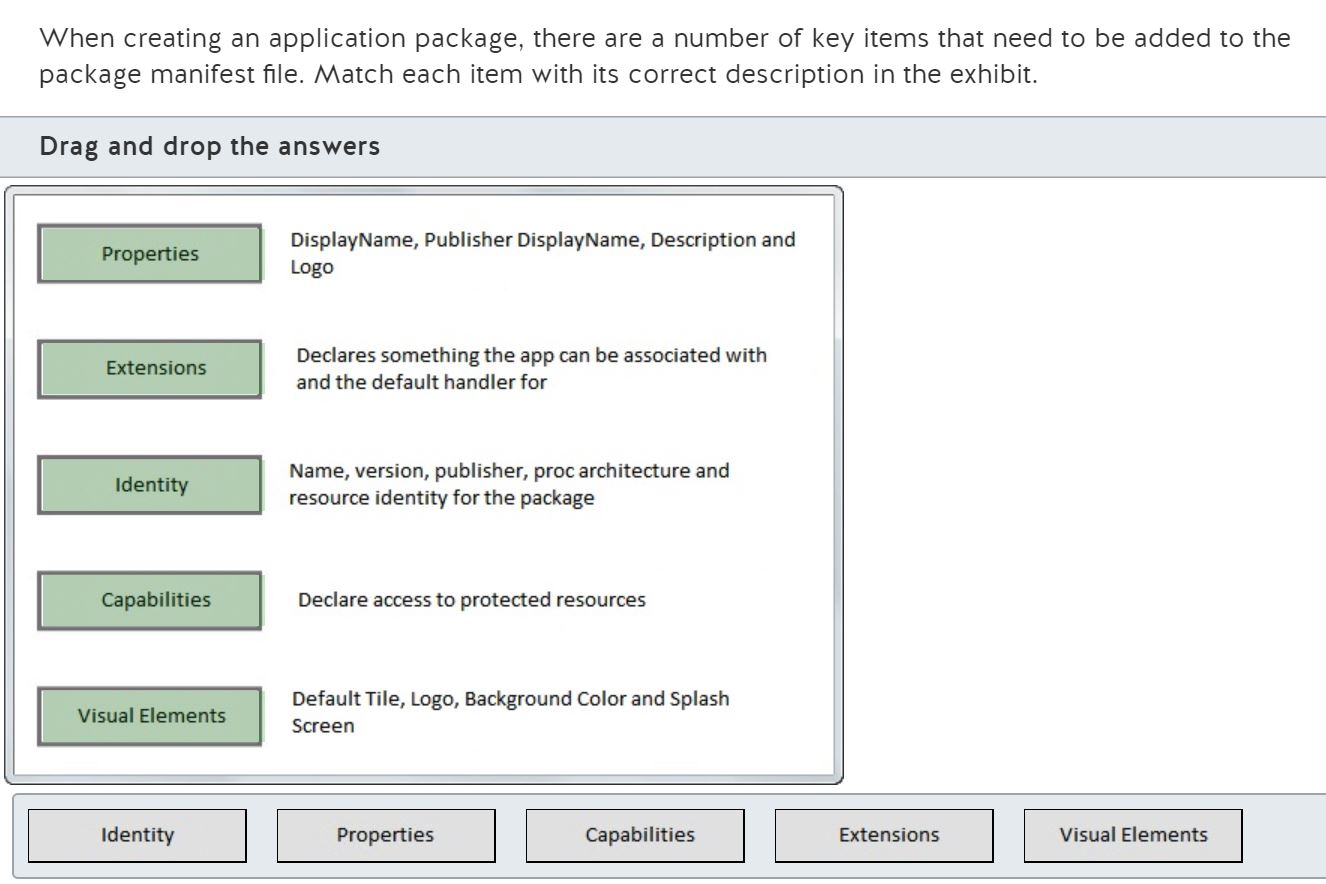
When creating an application package, there are a number of key items that need to be added to the package manifest file. Match each item with its correct description in the exhibit.
Drag and drop the answers




Explanation
When developing an application, the most important thing to remember is that the application is not written for an installer routine but as a downloadable package from the Windows Store. The app package is contained in a structure within a standard ZIP file and has the following contents defined by a manifest file:
* The Identity of the application, which has information such as the name and version of the app, the publisher info, processor info and resource ID.
* Package properties such as the display name, publisher display name, and application logo.
* Capabilities define what protected resources are requested by the application such as the Internet, a music library, etc.
* Extensions are entities such as file types that can be created by the application and for which the application can become the default handler.
* Visual elements include the default tile, the logo, the background color, and the splash screen.
Objective:
Manage the Application Life Cycle
SubObjective:
Understand the platform fundamentals.
References
MSDN
Microsoft
Copyright Year: 2012
Package and deployment metro style apps
Click here for more information
What is the name of the procedure by which the operating system terminates an application's process when the user navigates away from the application?
Choose the correct answer
Explanation
The correct name for the process that initiates when a user navigates forward and away from the current application is called tombstoning. The operating system will maintain information about the last state of the application so that it can be recalled when the application is reactivated.
Closing refers to the application state when the user presses the back button on the phone to the point that navigation moves beyond the initial application page.
Dormant is the process whereby a running application is replaced by a new application. For example an application will go dormant when the splash screen starts during phone lock or when another application is loaded.
Fast application switching is an enhancement to tombstoning in that Windows phone with the mango (7.5) enhancements can hold multiple applications in a ready to use state but an application can still be tombstoned if the running application requires additional memory.
Objective:
Manage the Application Life Cycle
SubObjective:
Understand the platform fundamentals.
References
MSDN
Microsoft
Copyright Year: 2012
Exercise 1: Introducing the Windows Phone Application Life Cycle
Click here for more information
What is the observed behavior of the following HTML5 snippet?
<!DOCTYPE html>
<title>Video</title>
<video controls autoplay>
<source src='videos/movie1.wbm'>
<source src='videos/movie1.ogv'>
</video>
Choose the correct answer
Explanation
When you do not know whether a browser will render the page, you need a fallback mechanism to play your media. You should list the video formats you have rendered your video in, and the browser plays the first one it supports.
The videos are neither played one above the other nor are they played side by side. The user is not offered a choice of format either by the implementation of this snippet.
Objective:
Build the User Interface by Using HTML5
SubObjective:
Choose and configure HTML5 tags to play media.
References
MSDN
Microsoft
Copyright Year: 2012
Working with Media in HTML5
Click here for more information
W3Schools
W3Schools
Copyright Year: 2012
HTML5 video Tag
Click here for more information
What is the observed behavior of the following HTML5 snippet?
<!DOCTYPE html>
<title>Video</title>
<video controls autoplay>
<source src='videos/movie1.wbm' type='video/webm'>
<source src='videos/movie1.ogv' type='video/ogg'>
</video>
Choose the correct answer
Explanation
When you do not know whether a browser will render the page, you need a fallback mechanism to play your media. You should list the video formats you have rendered your video in, and the browser plays the first one it supports. By adding the type attribute to the Source element you are providing the information that the browser needs to determine which file should be downloaded. The browser can check for supported MIME types before attempting to download the file.
The videos are neither played one above the other nor are they played side by side. The user is not offered a choice of format either.
Objective:
Build the User Interface by Using HTML5
SubObjective:
Choose and configure HTML5 tags to play media.
References
MSDN
Microsoft
Copyright Year: 2012
Working with Media in HTML5
Click here for more information
W3Schools
W3Schools
Copyright Year: 2012
HTML5 video Tag
Click here for more information
Which attribute of the video element can be used to ensure that the video player displays a static image while the video is downloading?
Choose the correct answer
Explanation
The Poster attribute of the video element provides an address or image file to display while there is no video data available.
Controls indicate that a user interface should be provided for controlling playback.
Autoplay can be used to instruct the video player to commence playback as soon as possible. With a fast download this can potentially prevent a back screen display, but the Poster attribute is the best choice in this scenario.
Preload can provide good downloading speeds because the video can be ignored and allowed to run as is. It can be configured to support downloading metadata about the objects only.
Objective:
Build the User Interface by Using HTML5
SubObjective:
Choose and configure HTML5 tags to play media.
References
W3C
W3C
Copyright Year: 2012
video - video (NEW) - HTML5
Click here for more information
W3Schools
W3Schools
Copyright Year: 2012
HTML5 video poster Attribute
Click here for more information
What is the observed behavior of the following HTML5 snippet?
<!doctype html>
<title>Audio</title>
<audio controls>
<source src='videos/Audio1.ogg' />
<source src='videos/Audio1.mp3' />
</audio>
Choose the correct answer
Explanation
When you do not know whether a browser will render the page contents, you need a fallback mechanism to play your media. You should list the audio formats you have created your music or audio file in, and the browser plays the first one it supports.
The audio tracks are neither played one above the other nor are they played side by side. The user is not offered a choice of format either.
Objective:
Build the User Interface by Using HTML5
SubObjective:
Choose and configure HTML5 tags to play media.
References
W3Schools
W3Schools
Copyright Year: 2012
HTML5 audio Tag
Click here for more information
W3C
W3C
Copyright Year: 2012
Audio Stream
Click here for more information
Which attribute can be used to control the output medium for which a video is intended? For example, if the developer wanted to ensure that a different video file was loaded based on the available screen resolution of the user's browser.
Choose the correct answer
Explanation
The media attribute is used to control the output medium for which a video is intended. For example, The media attribute can determine if the screen resolution matches a required number of pixels to ensure adequate playback.
The src attribute is simply indicating the URL from which the content should be loaded.
The type attribute controls whether the content will be downloaded. The type attribute also determines whether the content is subject to the supported MIME type that is available for playback, but it does not control the output medium.
The preload and controls attributes are not associated with the Source element.
Objective:
Build the User Interface by Using HTML5
SubObjective:
Choose and configure HTML5 tags to play media.
References
W3C
W3C
Copyright Year: 2012
source - media source NEW
Click here for more information
Which of the following video element attributes can be used to reduce the amount of bandwidth consumed when loading a page for the first time?
Choose the correct answer
Explanation
Preload can be used to determine whether or not a video is downloaded when the page is loaded. Using the value metadata will ensure only metadata associated with the file is downloaded. Choosing none will ensure the video is not loaded at all unless requested.
Poster provides a URL of an image to display when no video data is available and does not reduce the bandwidth consumed.
Autoplay has only one value and that defaults to automatically downloading and playing the video when the page is first loaded, so is not capable of reducing the bandwidth that is being consumed.
Controls indicate to the player that user controls should be made available.
Src indicates the URL of the video file to play. There is no way to use this parameter to control the bandwidth consumed.
Objective:
Build the User Interface by Using HTML5
SubObjective:
Choose and configure HTML5 tags to play media.
References
MSDN
Microsoft
Copyright Year: 2012
HTML5 - Working with Media in HTML5
Click here for more information
MSDN
Microsoft
Copyright Year: 2012
HTML5 Part 3: Audio and Video
Click here for more information
W3Schools
W3Schools
Copyright Year: 2012
HTML5 video preload Attribute
Click here for more information
Which HTML5 tag is used to specify independent, self-contained content and may typically be used in a blog, news, or forum posting?
Choose the correct answer
Explanation
The <article> tag specifies independent, self-contained content. The concept of an article is content that makes sense on its own and should be possible to distribute independently of the rest of the site.
The <aside> content should be related to the surrounding content tag but actually defines some content aside from the content in which it is placed.
The <caption> tag defines a table caption. It must be inserted immediately after the <table> tag. There can be only one caption per table.
The <source> tag allows you to specify alternative video and audio files that the browser may choose from, based on its media type or codec support.
The <label> tag defines a label for an <input> element. The <label> element provides a usability improvement for mouse users, because if the user clicks on the text within the <label> element, it toggles the control.
Objective:
Build the User Interface by Using HTML5
SubObjective:
Choose and configure HTML5 tags to display text content.
References
W3Schools
W3Schools
Copyright Year: 2012
HTML5 article Tag
Click here for more information
W3Schools
W3Schools
Copyright Year: 2012
HTML5 Tag Reference
Click here for more information
Which two HTML5 tags are related to formatting content in a table? (Choose two.)
Choose the correct answers
Explanation
The Thead tag defines section of a table header and the TBody tag defines the section that forms the body of the body of the table.
The Header element is used to define a container for navigation links or for introductory content.
The <base> tag specifies the base url for all relative URLs in a specific document. There can be only one <base> element in a document, and it must be located inside the <head> element.
The <hr> tag defines a thematic break or a change in topic in an HTML page. The <hr> element is used to separate content (or define a change) in an HTML page and generally appears as a horizontal line in visual browsers.
Objective:
Build the User Interface by Using HTML5
SubObjective:
Choose and configure HTML5 tags to display text content.
References
W3Schools
W3Schools
Copyright Year: 2012
HTML5 thead Tag
Click here for more information
W3Schools
W3Schools
Copyright Year: 2012
HTML5 tbody Tag
Click here for more information
W3Schools
W3Schools
Copyright Year: 2012
HTML5 Tag Reference
Click here for more information
Which HTML element can be used to format multiple sections of a table to set, for example, background colors across two columns?
Choose the correct answer
Explanation
The <col> tag specifies specific column properties, such as dimensions or colors, for each column within a <colgroup> element.
The <colgroup> element itself does not have any formatting attributes in HTML5, although it did in previous versions of HTML.
The <area> tag is nested inside a <map> tag and defines an area inside an image-map (an image-map is an image with clickable areas).
The <mark> tag defines marked or highlighted text in the current document.
The <section> tag defines sections such as chapters, headers, and footers within the current document.
Objective:
Build the User Interface by Using HTML5
SubObjective:
Choose and configure HTML5 tags to display text content.
References
W3Schools
W3Schools
Copyright Year: 2012
HTML5 Tag Reference
Click here for more information
W3Schools
W3Schools
Copyright Year: 2012
HTML5 col Tag
Click here for more information
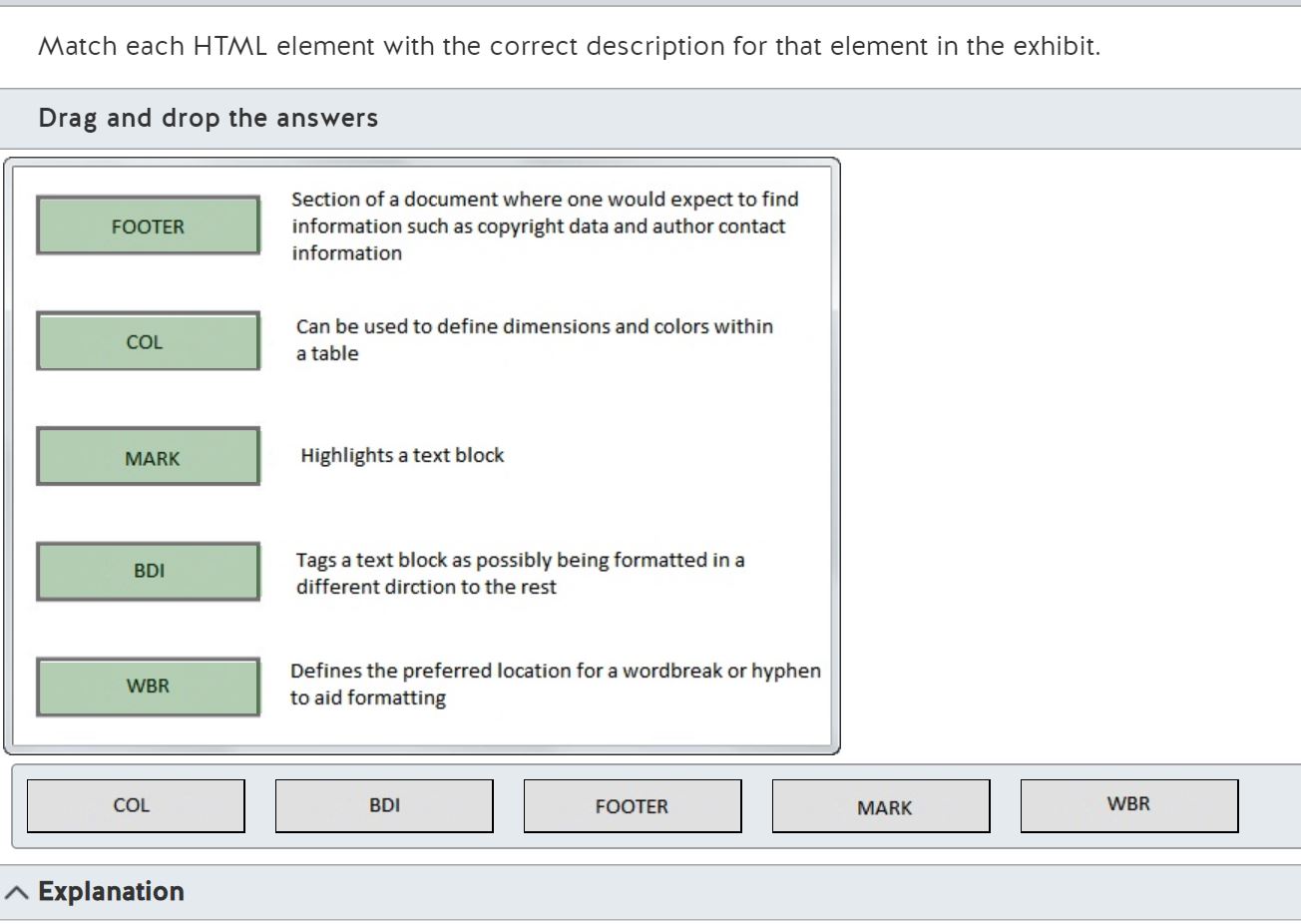
Match each HTML element with the correct description for that element in the exhibit.
Drag and drop the answers





Explanation
The <col> tag specifies specific column properties, such as dimensions or colors, for each column within a <colgroup> element.
The <bdi> tag defines a section of text that may be formatted in the reverse direction. A good example would be Arabic text that is read from right-to-left.
The <footer> tag defines the area at the bottom of the page when contextual information is held.
The <mark> tag defines marked or highlighted text in the current document.
The <wbr> tag defines a section of a line that can contain an optional word break to aid in formatting the page.
Objective:
Build the User Interface by Using HTML5
SubObjective:
Choose and configure HTML5 tags to display text content.
References
W3Schools
W3Schools
Copyright Year: 2012
HTML5 Tag Reference
Click here for more information
What is a tag that can be used to provide additional content on a page that the user can open and close on demand?
Choose the correct answer
Explanation
The Details tag specifies additional content that the user can view or hide on demand.
The Form element defines an HTML form used for user input.
Area is used to define a specific area of an image map.
Canvas is an element used for drawing pictures, usually via JavaScript.
Cite can be used to accentuate a title of a piece of work.
Objective:
Build the User Interface by Using HTML5
SubObjective:
Choose and configure HTML5 tags to display text content.
References
W3Schools
W3Schools
Copyright Year: 2012
HTML5 Tag Reference
Click here for more information
W3Schools
W3Schools
Copyright Year: 2012
HTML5 details Tag
Click here for more information
Review the code snippet below:
<!DOCTYPE html>
<html>
<body>
<details>
<summary>Opening Text Sample</summary>
<p>The quick brown fox jumped over the lazy dog.</p>
</details>
</body>
</html>
To force the details panel to open automatically, <details> tag needs to be modified.
Which two lines can be used to modify the <details> tag? (Each correct answer presents a complete solution. Choose two.)
Choose the correct answers
Explanation
The Open attribute of the Details element can be used to control its behavior when the page loads. The attribute is a Boolean, and can be set in the following ways:
<details open>
<details open="open">
<details open="">
Not adding the attribute implies the details section is closed on page load.
The true, auto, and enable values for the open attribute of the details tag are invalid and will have the net effect of loading the section as closed on page load.
Objective:
Build the User Interface by Using HTML5
SubObjective:
Choose and configure HTML5 tags to display text content.
References
W3Schools
W3Schools
Copyright Year: 2012
HTML5 Tag Reference
Click here for more information
W3Schools
W3Schools
Copyright Year: 2012
HTML5 details open Attribute
Click here for more information
Review the code snippet below: (Line numbers are included for reference purposes only.)
1 <canvas id="mySampleCanvas" width="200" height="100" style="border:1px solid #c3c3c3;"></canvas>
2 <script type="text/javascript">
3 var c=document.getElementById("mySampleCanvas");
4 var ctx=c.getContext("2d");
5 ctx.beginPath();
6 ctx.arc(70,50,15,0,Math.PI,true);
7 ctx.closePath();
8 ctx.fill();
9 </script>
What object is drawn by the code on lines 5 through 8 of the snippet?
Choose the correct answer
Explanation
The arc function draws lines using the following syntax:
arc(x,y,radius,sAng,eAng,rotFlag)
sAng and eAng are in radians and rotFlag is a Boolean. In this example, a semi-circle is drawn with a radius of 15, a start angle of 0, and an end angle of PI radians. Since there are 2 x PI radians in a complete circle, PI must be a half or semicircle. The command is completed by the ctx.fill to fill shape with its default color.
Objective:
Build the User Interface by Using HTML5
SubObjective:
Choose and configure HTML5 tags to display graphics.
References
W3Schools
W3Schools
Copyright Year: 2012
HTML5 Tag Reference
Click here for more information
W3Schools
W3Schools
Copyright Year: 2012
HTML5 canvas Tag
Click here for more information
Which three features are attributed to Canvas and not to Scalable Vector Graphics (SVG)? (Each correct answer presents part of the solution. Choose three.)
Choose the correct answers
Explanation
When Comparing Canvas and SVG, there are some simple, but fundamental differences.
Canvas:
* Is resolution dependent
* Has no event handlers support
* Has poor text rendering capabilities
* Saves the resulting image as .png or .jpg
* Is best-suited for graphic-intensive games where many objects are redrawn frequently
SVG:
* Is resolution independent
* Supports event handlers
* Is best-suited for applications with large rendering areas (mapping or planning applications)
* Uses the DOM and is likely to suffer from slow rendering if complex
* Is not suited for game applications
Objective:
Build the User Interface by Using HTML5
SubObjective:
Choose and configure HTML5 tags to display graphics.
References
W3Schools
W3Schools
Copyright Year: 2012
HTML5 Canvas vs. SVG
Click here for more information
The globalCompositeOperation defines how images placed on a canvas will interact when they share the same canvas areas.
Which statement describes the Destination-In operation?
Choose the correct answer
Explanation
To define the answers, it is important to understand the nature of the -In, -Out, and -Over terminology and what is understood by Source and Destination.
Destination-In implies that the destination image is displayed where both the source and destination are opaque. Other regions are transparent. In this case, the destination image is copied into the source image.
Source-In implies that the source image is displayed where both the source and destination are opaque. Other regions are transparent. In this case, the source image is copied into the destination image.
Lighter implies that the sum of the source image and destination image is displayed. Color values approach 1 as a limit. In this case, the source image is copied plus the destination image.
Source-Out implies that the source image is displayed where the source is opaque and the destination is transparent. In this case, the source image is copied out of the destination image.
Objective:
Build the User Interface by Using HTML5
SubObjective:
Choose and configure HTML5 tags to display graphics.
References
MSDN
Microsoft
Copyright Year: 2012
globalCompositeOperation property
Click here for more information
If a ball is drawn onto a canvas at positions x,y, which three statements are true when the ball is visible within a rectangle of dimensions top, bottom, left and right? (Choose three.)
Choose the correct answers
Explanation
To evaluate these expressions, one has to realize that the canvas object is measured from the top left hand corner. To make an object visible it must be drawn within the boundaries of a canvas. If we define the canvas as starting at 0,0 in the top left, then "top" also = 0 and "left" also = 0.
To qualify as a correct answer, the following must be true:
x > top = 1
x < bottom = 1
y > left = 1
y < right = 1
AND
x < top =0
x > bottom = 0
y < left = 0
y > right = 0
The three correct answers equate to:
( 1 AND 1) AND (1 AND 1) = 1
( 1 OR 1) AND (1 OR 0) = 1
(0 AND 0) OR (1 AND 1) = 1
The two incorrect and answers equate to:
( 0 AND 0) AND ( 0 AND 0) = 0
( 0 OR 0) AND (1 OR 1) = 0
Therefore, the correct answers are:
(x > top AND x < bottom) AND (y> left AND y < right)
(x > top OR x < bottom) AND (y >left OR y > right)
(x <top AND x>bottom) OR (y> left AND y < right)
Objective:
Build the User Interface by Using HTML5
SubObjective:
Choose and configure HTML5 tags to display graphics.
References
W3Schools
W3Schools
Copyright Year: 2012
HTML5 Canvas
Click here for more information
MSDN
Microsoft
Copyright Year: 2012
Canvas Property
Click here for more information
Review the code snippet below (line numbers are included for reference purposes only):
1 function rotateRect()
2 { var canvas = document.getElementById("MyCanvas");
3 if (canvas.getContext)
4 { var ctx = canvas.getContext("2d");
5 ctx.clearRect(0,0,canvas.width,canvas.height);
6 ---- ROTATE 5 DEGREES --
7 draw();
8 }}
What is the correct code sample to include at line 6 to rotate the canvas by 5 degrees?
Choose the correct answer
Explanation
To rotate the canvas, the value of the rotate method must be supplied in RADIANS. To convert RADIANS into degrees you have to realize that there are 2*PI radians in a circle. Therefore, 2*PI = 360 Degrees and so 1 degree = PI/180 .
To calculate the angle of 5 degrees, 5 * PI/180 . It is expressed correctly as ctx.rotate(5 * Math.PI/180) .
Ctx.rotate(5) would rotate the canvas by 5 RADIANS or about 286 degrees. Ctx.rotate(5) would not rotate the canvas by 5 degrees.
ctx.rotate(360/5) would rotate the canvas by 72 RADIANS or about 11 and a half complete rotations. ctx.rotate(360/5) would not rotate the canvas by 5 degrees.
ctx.rotate(5 * Math.PI/360) would not rotate far enough and is actually equivalent to 2.5 Degrees, while ctx.rotate(5 * Math.PI) would rotate about 15.5 RADIANS or 7 and one half rotations.
Objective:
Build the User Interface by Using HTML5
SubObjective:
Choose and configure HTML5 tags to display graphics.
References
W3Schools
W3Schools
Copyright Year: 2012
HTML5 Canvas
Click here for more information
MSDN
Microsoft
Copyright Year: 2012
rotate method
Click here for more information
Which four features are attributed to SVG and not to Canvas? (Each correct answer presents part of the solution. Choose four.)
Choose the correct answers
Explanation
When Comparing Canvas and SVG, there are some simple, but fundamental differences.
Canvas:
* Is resolution dependent
* Has no event handlers support
* Has poor text rendering capabilities
* Saves the resulting image as .png or .jpg
* Is best-suited for graphic-intensive games where many objects are redrawn frequently
SVG:
* Is resolution independent
* Supports event handlers
* Is best-suited for applications with large rendering areas (mapping or planning applications)
* Uses the DOM and is likely to suffer from slow rendering if complex
* Is not suited for game applications
Objective:
Build the User Interface by Using HTML5
SubObjective:
Choose and configure HTML5 tags to display graphics.
References
W3Schools
W3Schools
Copyright Year: 2012
Canvas vs, SVC
Click here for more information
The globalCompositeOperation defines how images placed on a canvas will interact when they share the same canvas areas.
Which statement describes the Lighter operation?
Choose the correct answer
Explanation
To define the answer, it is important to understand the nature of the -In, -Out, and -Over terminology and what is understood by Source and Destination.
Lighter implies that the sum of the source image and destination image is displayed. Color values approach 1 as a limit. In this case, the source image is copied plus the destination image.
Destination-In implies that the destination image is displayed where both the source and destination are opaque. Other regions are transparent. In this case, the destination image is copied into the source image.
Source-In implies that the source image is displayed where both the source and destination are opaque. Other regions are transparent. In this case, the source image is copied into the destination image.
Source-Out implies that the source image is displayed where the source is opaque and the destination is transparent. In this case, the source image is copied out of the destination image.
Objective:
Build the User Interface by Using HTML5
SubObjective:
Choose and configure HTML5 tags to display graphics.
References
MSDN
Microsoft
Copyright Year: 2012
GlobalCompositeOperation Property
Click here for more information
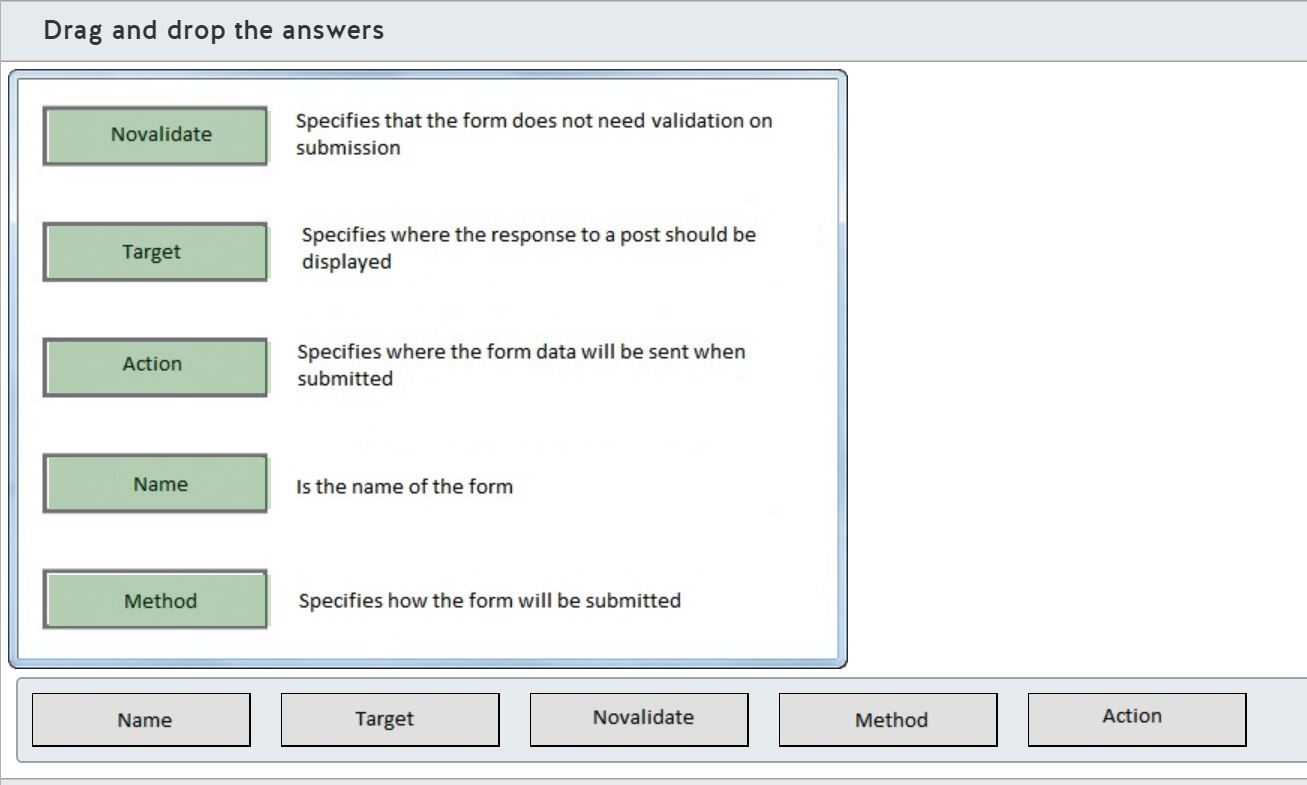
Match each HTML5 Form element attribute in the exhibit with the correct description for the attribute.
Drag and drop the answers





Explanation
The Action form attribute defines the URL where the submitted data is to be sent.
The Method form attribute defines how the form is submitted by the browser, either as a GET (form fields are sent as query string parameters) or a POST (form fields are sent as the body of the HTTP request).
Novalidate is used to specify that no form validation is needed when submitting the form data.
Target specifies where the response is received after the form is submitted. There are four supported special options; -blank, -self, -parent or -top.
The Name attribute simply defines the name of the form in the browser, which can be used for referencing the form via JavaScript.
Objective:
Build the User Interface by Using HTML5
SubObjective:
Choose and configure HTML5 tags to organize content and forms.
References
W3Schools
W3Schools
Copyright Year: 2012
HTML5 form Tag
Click here for more information
What is the output of the following HTML 5 snippet?
<ol>
<li>Red</li>
<li>Blue</li>
<li>Green</li>
</ol>
<ul>
<li>Train</li>
<li>Plane</li>
<li>Boat</li>
</ul>
Choose the correct answer
Explanation
The <ol> element defines ordered list, which creates a numbered list.
The <ul> element defines an unordered list, which has bullet points, not numbers.
Objective:
Build the User Interface by Using HTML5
SubObjective:
Choose and configure HTML5 tags to organize content and forms.
References
HTML-5.com
HTML-5.com
Copyright Year: 2012
HTML li Tag for List Items
Click here for more information
W3Schools
W3Schools
Copyright Year: 2012
HTML5 li Tag
Click here for more information
Which three tags are considered to be HTML 5 Sectioning Root Tags? (Choose three.)
Choose the correct answers
Explanation
By definition a Sectioning Root Tag is one in which the sections and headings used within it are not included in the outline of any higher level section. The three root sections elements are:
* <blockquote> - Is similar to a paragraph except that the content is indented and italicized by default.
* <fieldset> -Is used to label a set of related fields, usually in an html form.
* <body> - Creates the body section that defines the visible content of the document
In addition to the elements listed above, <details>, <figure> and <td> are also Sectioning Root Tags.
The other elements are section tags, but are not considered to be root tags:
* <article> - Contains the main subject of the html document
* <section> - Indicate a split in the content of a document or to separate articles or asides into sections generally.
* <aside> - Creates a sidebar on the main article.
Objective:
Build the User Interface by Using HTML5
SubObjective:
Choose and configure HTML5 tags to organize content and forms.
References
HTML-5.com
HTML-5.com
Copyright Year: 2012
HTML Tag Reference - HTML 5 and Beyond
Click here for more information
W3Schools
W3Schools
Copyright Year: 2012
HTML5 section Tag
Click here for more information
You have been asked to provide a means of adding a standard title to all the HTML tables in a document.
Which HTML tag is the most appropriate for a table title that appears above the table by default in the document?
Choose the correct answer
Explanation
In order to create a table title that appears above a table, you should use the <caption> element.
The <head> element defines the container for all the document metadata.
The <title> element provides a means of titling the html document so that its title appears in the browser toolbar.
The <header> tag defines a header for a document or a section of a document.
The <label> tag provides a means to add a label to an input element and is usually used to describe the type of input needed.
The <legend> tag simply defines a caption for the <fieldset> element.
Objective:
Build the User Interface by Using HTML5
SubObjective:
Choose and configure HTML5 tags to organize content and forms.
References
HTML-5.com
HTML-5.com
Copyright Year: 2012
HTML Tags
Click here for more information
W3Schools
W3Schools
Copyright Year: 2012
HTML5 Tutorial
Click here for more information
You are designing a form that will have a number of buttons in addition to the default submit button.
Which two attributes can you use to ensure the data in the form is sent to the correct target defined by the button clicked? (Choose two.)
Choose the correct answers
Explanation
To define the target for submission of form data, you can use the action and formaction attributes. The action attribute on a <form>-element is used to define the default submission target and is sufficient to use when only one submit option exists on the form. The formaction attribute on a submit button element can override the form’s default action attribute allowing data submission to different targets.
The formmethod attribute on a submit button element overrides the submission type of the form, whether GET or POST. The formmethod attribute does not ensure the data in the form is sent to the correct target defined by the button clicked.
The autocomplete attribute on a <form>-element allows the browser to autofill the input boxes on the form based on values the user has entered before. The use of this attribute may also require the browser to be configured to support it. The autocomplete attribute does not ensure the data in the form is sent to the correct target defined by the button clicked.
The step attribute on a <input>-element is used to help validate the value added to the input box as steps of the attribute value. For example in step =2, then valid values are -2,0,-2,-4 etc. <step> does not ensure the data in the form is sent to the correct target defined by the button clicked.
Finally the formtarget attribute on a submit button element defines where the return from the form submission will be displayed. The formtarget attribute does not ensure the data in the form is sent to the correct target defined by the button clicked.
Objective:
Build the User Interface by Using HTML5
SubObjective:
Choose and configure HTML5 tags to organize content and forms.
References
HTML-5.com
HTML-5.com
Copyright Year: 2012
HTML Tag Reference - HTML 5 and Beyond
Click here for more information
W3Schools
W3Schools
Copyright Year: 2012
HTML5 Tutorial
Click here for more information
Which two HTML5 items should be used to construct a global navigator for a web site? (Choose two.)
Choose the correct answers
Explanation
To construct a global navigation list for a web site, you can use the new <nav> element combined with the href attribute of one or more <a> elements. This provides a set of hyperlinked global navigation choices.
The datalist element is used to provide a list of input choices on a form, not as navigation.
The list attribute is used in many places, but in this case, it is just a list of values, not a navigation related element.
The output element is new and provides a means of evaluating an expression without the use of Javascript.
The section element, while it would be valid for it to contain a navigation structure, does not provide the structure itself.
Objective:
Build the User Interface by Using HTML5
SubObjective:
Choose and configure HTML5 tags to organize content and forms.
References
W3Schools
W3Schools
Copyright Year: 2012
HTML5 Canvas
Click here for more information
MSDN
Microsoft
Copyright Year: 2012
nav element | nav object
Click here for more information
Which element can be used in conjunction with the ruby element to provide optional parentheses for browsers that do not support ruby HTML5 annotations?
Choose the correct answer
Explanation
The <rp> element is used in conjunction with the <ruby> and <rt> elements. It is the <rp> element that defines what is visible for browsers that do not support the <ruby> element, and it can therefore be used to show parenthesis around the content of nested <rt> elements.
The <rt> element provides a definition or pronunciation to support the <ruby> element.
The <ruby> element itself consists of <rt> and optionally <rp> elements to define the pronunciation of characters. It is most notably used for east Asian languages.
Use of the <li> element is not applicable to <ruby> element because it is used to define an item in an ordered, unordered or menu list.
<wbr> is an element that defines a location within a word, where the browser may insert a word break to improve the appearance of the text.
Objective:
Build the User Interface by Using HTML5
SubObjective:
Choose and configure HTML5 tags to organize content and forms.
References
W3Schools
W3Schools
Copyright Year: 2012
HTML5 ruby Tag
Click here for more information
What can you use to provide a selection choice for an input box?
Choose the correct answer
Explanation
The list attribute of an input box provides a mechanism to link the input box to a predefined list of choices.
The <option> element provides a dropdown list but linked to a select or datalist element not an input element. The <option> element does not provide a selection choice for an input box.
The range input type defines the range of numbers within which the input is considered valid for submission. The range input type does not provide a selection choice for an input box.
When using <option> elements within a <select> element, a good practice is to include <optgroup> elements to break up a long list into sub categories. By itself <optgroup> does not provide the requested capability as it does not provide a selection choice for an input box.
Using the pattern attribute allows for regular expression type validation of an input box, but does not offer any list like choices.
Finally, the placeholder attribute gives the user a short descriptive piece of text to describe the expected input. The placeholder attribute does not provide a selection choice for an input box.
Objective:
Build the User Interface by Using HTML5
SubObjective:
Choose and configure HTML5 tags for input and validation.
References
HTML-5.com
HTML-5.com
Copyright Year: 2012
HTML Tag Reference - HTML 5 and Beyond
Click here for more information
W3Schools
W3Schools
Copyright Year: 2012
HTML5 Tutorial
Click here for more information
You are designing a form for an online sales store and need to provide a means of cryptographically identifying and securing the user session while users are connected to the site. The web site itself has SSL in place, but there is no capability for individual user certificates.
What HTML5 feature can you use to provide this capability?
Choose the correct answer
Explanation
The <keygen> element is used to generate a public/private key pair on submission. This is alternative to SSL where the public key is sent to the client and the private key is held by the server. Here, the public key is sent to the server and the client retains the private key, thereby ensuring the client can be identified as well as the server.
The <strong> element is not related to encryption at all and in fact, simply defines the font as strong or bold.
Server-Sent event messaging is a way for the server to notify the client that new events have occurred. A typical implementation of Server-Sent event messaging is used when Facebook or Twitter notify the browser of changes.
The <code> element is used to define the following text as computer code and augments the font to make the text standout as a predefined font type. <code> does not provide a means of cryptographically identifying and securing the user session while users are connected to the site.
Finally the formenctype attribute defines the encoding type of a submitted form using the POST submission method but does not define any form of encryption.
Objective:
Build the User Interface by Using HTML5
SubObjective:
Choose and configure HTML5 tags for input and validation.
References
HTML-5.com
HTML-5.com
Copyright Year: 2012
HTML Tag Reference - HTML 5 and Beyond
Click here for more information
W3Schools
W3Schools
Copyright Year: 2012
HTML5 Tutorial
Click here for more information
From the sample HTML below, choose which two values are valid for submission on the form. (Choose two.)
<form action="subform.asp">
<input type="number" name="points" step="3" min="2" max="7" />
<input type="submit" />
</form>
Choose the correct answers
Explanation
The valid values here are defined by all the attributes and can be read as values in the range 2 to 7 that are in steps of 3. The first part of the range would make all the answers except 9 valid. , However as the step attribute is applied to the points input field valid values much match the min value augmented by the stepbase. In this case that means the values 2 and 5 are the only valid entries since 2 is the stepbase and 2+3 = 5, which is also within the range.
The values 3 and 6 are incorrect because, while they comply with the step of 3, they do not match the step when 2 is used as the base.
Objective:
Build the User Interface by Using HTML5
SubObjective:
Choose and configure HTML5 tags for input and validation.
References
HTML-5.com
HTML-5.com
Copyright Year: 2012
HTML Tag Reference - HTML 5 and Beyond
Click here for more information
W3Schools
W3Schools
Copyright Year: 2012
HTML5 Tutorial
Click here for more information
From the sample HTML below, choose which answer can replace the ""XXX"" pattern to ensure that only three non-international letters are accepted for submission on the form:
Country code: <input type="text" name="country-code" pattern="XXX">
Choose the correct answer
Explanation
The correct answer is [A-Za-z]{3} , which means the system can accept the upper or lowercase letter ranges between A to Z and a to z, but can only accept precisely three individual letters.
[^0-9]{3} will validate the input of three characters that are non-numeric, but it does not limit the response to letters only. It will allow any non-numeric character.
[a-Z] does not represent a valid regular expression format and is therefore not a correct answer to the problem.
^[A-Za-z]$ is a valid regular expression requiring that the string contain only one upper or lowercase character in the range from a-z, not three letters.
[^A-Za-z]{3}$ is again a valid regular expression, but represents a test for three characters not in the ranges a-z and A-Z, and that is not correct.
Objective:
Build the User Interface by Using HTML5
SubObjective:
Choose and configure HTML5 tags for input and validation.
References
W3Schools
W3Schools
Copyright Year: 2012
HTML5 input type Attribute
Click here for more information
W3Schools
W3Schools
Copyright Year: 2012
HTML5 Form Attributes
Click here for more information
From the sample HTML below, choose which answer can replace the "XXX" pattern to ensure that only three non-international letters followed by three numbers are accepted for submission on the form:
Country code: <input type="text" name="country-code" pattern="XXX">
Choose the correct answer
Explanation
The correct answer here is ^([A-Za-z]){3}([0-9]){3}$ , which means the system can accept the upper or lowercase letter ranges between A to Z and a to z, but it only accept three individual letters at the start of the input followed by three numbers at the end of the input.
[^a-zA-Z0-9]{3} will validate the input of three characters, but only non-alphanumeric characters.
([a-zA-Z0-9]){6} will allow three letters followed by three numbers, but does not limit it to that format because it also accepts six numbers or six letters or generally any six characters in the ranges a-z, A-Z and 0-9.
^([A-Za-z]+)([0-9]+)$ will allow one or more words of one letter or more at the start of the input followed by one or more numbers of one number or more at the end of the input.
[^A-Za-z0-9]{3}$ will validate the input of three characters, but only non-alphanumeric characters and must end in a non-alphanumeric value.
Objective:
Build the User Interface by Using HTML5
SubObjective:
Choose and configure HTML5 tags for input and validation.
References
W3Schools
W3Schools
Copyright Year: 2012
HTML5 input type Attribute
Click here for more information
W3Schools
W3Schools
Copyright Year: 2012
HTML5 Form Attributes
Click here for more information
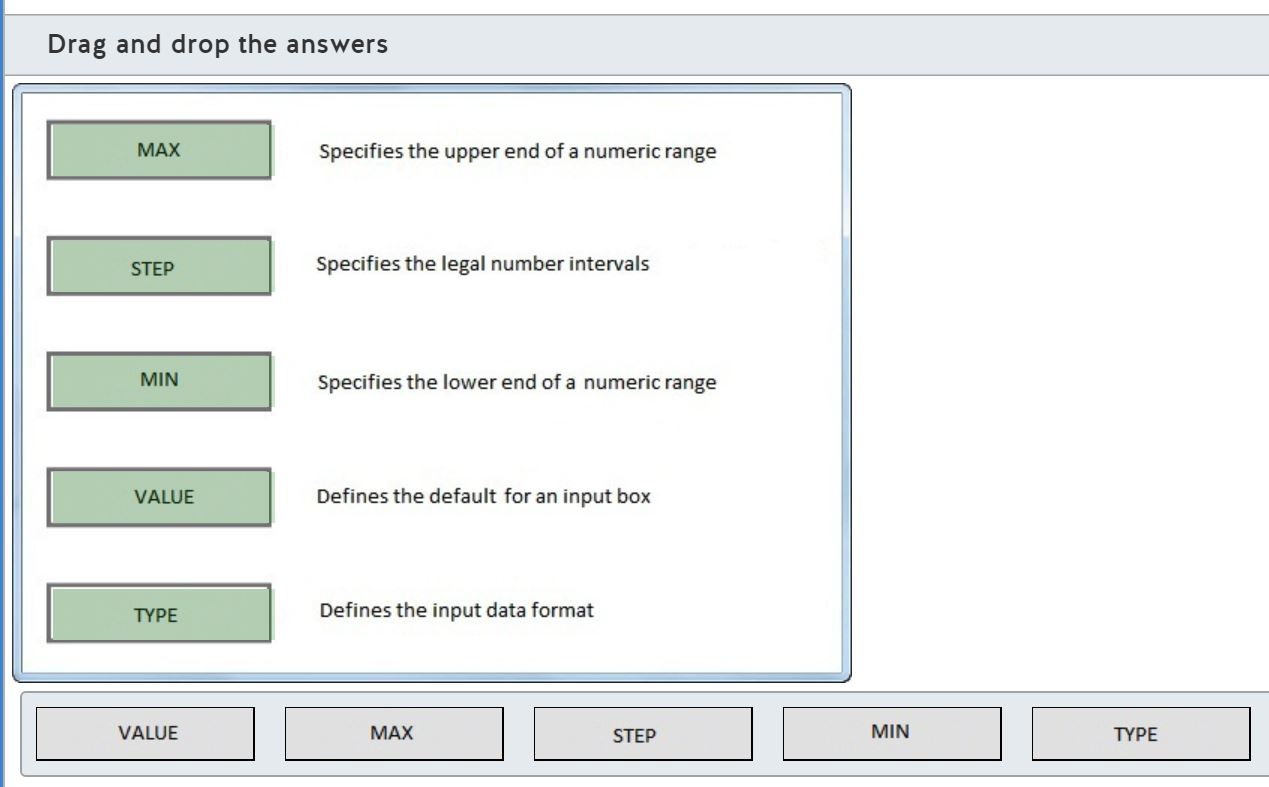
Match each HTML 5 Input Tag validation attribute with the correct description in the exhibit.
Drag and drop the answers





Explanation
The Type attribute defines the type of data being requested for input. Some examples include number, text, date, etc.
Step denotes the legal interval values allowed. For example, a step of 3 means values that are 0,3 or 6 added to the min-attribute’s value are allowed.
The Min and Max attributes denote the minimum and maximum values allowed.
Value denotes the default value of the input box.
Objective:
Build the User Interface by Using HTML5
SubObjective:
Choose and configure HTML5 tags for input and validation.
References
W3Schools
W3Schools
Copyright Year: 2012
HTML5 input type Attribute
Click here for more information
W3Schools
W3Schools
Copyright Year: 2012
HTML 5 Form Attributes
Click here for more information
You need to fade the foreground color of a hyperlink when the user points the cursor to it. You should use Cascading Style Sheet (CSS) styles that support the Google Chrome browser.
Which of the following CSS properties is required?
Choose the correct answer
Explanation
To gradually change CSS properties over time, the CSS 3 specification provides for an animation technique known as "transitions". Transitions can be configured using the four transition properties (using the vendor-specific prefixes -moz-, -webkit-, or -o-):
* transition-property
* transition-duration
* transition-timing-function
* transition-delay
The CSS 3 specification also provides the shorthand property known as "transition" to set any or all of these properties in a single CSS property declaration.
The -webkit-transition-duration CSS property is required. This property defines the duration of the transition in units of milliseconds (ms) or seconds (s). When the animation is triggered, such as when the :hover pseudo-element applies, the property will gradually change from its original value to the value specified in the transition style using the specified duration. When the trigger no longer applies, the transition is reversed using the same specified duration. The default value is 0 (zero) - which means the property change is instantaneous.
The -webkit-transition-property CSS property is not required. This property can be set to a comma-delimited list of CSS property names that should use the transition. The keywords "all" and "none" are also valid values for this property. The default value for this property is "all".
The -webkit-transition-timing-function property is not required. This property defines a function that takes the relative duration as input and returns the relative animation completion as output. By using a function, the animation does not have to be a perfectly smooth transition, but can progress at various speeds over time.
This property can be set to the following keywords (the default is "ease"):
* "ease" - the transition should be slow at the beginning and end, but fast in the middle
* "ease-in" - the transition should be slow at the beginning, but fast at the end
* "ease-out" - the transition should be fast at the beginning, but slow at the end
* "ease-in-out" - similar to "ease", but less variation between the fastest and slowest speeds
* "linear" - the transition should be at a constant speed
This property can alternatively be set to a cubic Bezier function. A cubic Bezier function can control the speed of the transition with greater precision than the keywords.
The -webkit-transition-delay CSS property is not required. This property defines the duration of time to wait before starting the animation. This animation is defined in units of milliseconds (ms) or seconds (s). The default value is zero (no delay).
Objective:
Format the User Interface by Using CSS
SubObjective:
Manage the graphical interface by using CSS.
References
W3C
W3C
Copyright Year: 2012
CSS Transitions
Click here for more information
The Book of CSS3
No Starch Press
Copyright Year: 2012
Transitions and Animations
Chapter 13
W3Schools
W3Schools
Copyright Year: 2012
CSS3 Transition
Click here for more information
When using Cascading Style Sheet (CSS) 3-dimensional transformations, which transform function or property is required to make "closer" objects appear larger in the Safari browser?
Choose the correct answer
Explanation
You should use the -webkit-perspective property. This property enables a 3-dimensional perspective in which "closer" objects grow and "distant" objects shrink.
You should not use the -webkit-perspective-origin property. This property works with the -webkit-perspective property to determine the angle at which the horizon vanishes. If the -webkit-perspective property has not been set, -webkit-perspective-origin will have no effect.
You should not use the translateZ transform function. This function moves the element along the z-axis - either closer to or away from the viewer. This function will not have an effect on apparent size unless the -webkit-perspective property has been set.
You should not use the scaleZ transform function. This function is used with the translateZ transform function to modify the growth factor when the -webkit-perspective property has been set. This function will not have an effect on apparent size when used on its own.
Objective:
Format the User Interface by Using CSS
SubObjective:
Manage the graphical interface by using CSS.
References
W3C
W3C
Copyright Year: 2012
CSS Transforms
Click here for more information
W3Schools
W3Schools
Copyright Year: 2012
CSS3 3D Transforms
Click here for more information
The Book of CSS3
No Starch Press
Copyright Year: 2012
3D Transformations
Chapter 14
Course 10953A
Microsoft
Copyright Year: 2012
Advanced CSS by Using CSS3
Module 4
To round the top-left corner of a Hypertext Markup Language (HTML) element, which Cascading Style Sheet (CSS) property should you use?
Choose the correct answer
Explanation
You should use the border-top-left-radius CSS property. This property can be set to a constant radius for rounded corners, or it may be set to a horizontal radius followed by a vertical radius for elliptical corners. This CSS property is the recommended implementation supported by all modern browsers.
You should not use the -webkit-border-top-left-radius CSS property. This property is supported by WebKit browsers only, including Google Chrome and Apple Safari, and is ignored by other browsers.
You should not use the -moz-border-radius-topleft property. This property is supported only by Mozilla Firefox. This property is not compatible with the World Wide Web Consortium (W3C) Candidate Recommendation, and should only be used for backward compatibility with older versions of the Firefox browser. This property is not supported in Firefox 13.0 and later.
You should not use the border-radius-topleft property. This form of the property is based on the early version of the Firefox rounded corner implementation and is not supported by any browser without a vendor-specific prefix.
Objective:
Format the User Interface by Using CSS
SubObjective:
Manage the graphical interface by using CSS.
References
W3C
W3C
Copyright Year: 2012
CSS Backgrounds and Borders Module Level 3
Click here for more information
W3Schools
W3Schools
Copyright Year: 2012
CSS3 Borders
Click here for more information
The Book of CSS3
No Starch Press
Copyright Year: 2012
Border and Box Effects
Chapter 9
Course 10953A
Microsoft
Copyright Year: 2012
Advanced CSS by Using CSS3
Module 4
MDN
Mozilla
Copyright Year: 2012
border-radius - MDN
Click here for more information
Which Cascading Style Sheet (CSS) techniques can be used to create transparent Hypertext Markup Language (HTML) elements? (Each correct answer presents a complete solution. Choose three.)
Choose the correct answers
Explanation
You should use the opacity CSS property. This property accepts a number between 0.0 and 1.0, where 0.0 is fully transparent, and 1.0 is fully opaque. The opacity CSS property defines the maximum opacity for the element and all of its child elements. When the opacity property is specified on a parent element and a child element, they combine using multiplication. For example, if you have a div element with an opacity set to 0.5 and a child h1 element with an opacity set to 0.5, the effective opacity of the h1 element would be 0.25 (0.5 times 0.5).
You should use the rgba color function. This property accepts three integer arguments, each between 0 and 255, for the red, green, and blue channels. The fourth argument is a number between 0.0 and 1.0 or the alpha channel.
You should use the hsla color function. This property accepts four arguments. The first is hue, defined as an angle in degrees. The second argument is saturation, defined as a percentage. The third argument is lightness (sometimes called luminance), defined as a percentage. The final argument is alpha, defined as a number between 0.0 and 1.0, where 0.0 is fully transparent and 1.0 is fully opaque.
You should not use hexadecimal to define a color with transparency. Because this is not supported in the CSS recommendation, it will be unrecognized by the browser and ignored.
You should not use the transparency CSS property. This property is not defined in the CSS recommendation, and is not recognized by browsers.
Objective:
Format the User Interface by Using CSS
SubObjective:
Manage the graphical interface by using CSS.
References
W3C
W3C
Copyright Year: 2012
CSS Color Module Level 3
Click here for more information
W3Schools
W3Schools
Copyright Year: 2012
CSS Legal Color Values
Click here for more information
W3Schools
W3Schools
Copyright Year: 2012
CSS3 opacity Property
Click here for more information
The Book of CSS3
No Starch Press
Copyright Year: 2012
Color and Opacity
Chapter 10
Which font format is supported by the most browsers?
Choose the correct answer
Explanation
Web Open Font Format (WOFF) is the font format supported by the most browsers. This format is designed to address some of the perceived shortcomings of publishing other font formats on the World Wide Web, especially copy protection and cross-origin font loading.
TrueType Font (TTF) is the font format supported by WebKit, Firefox, and Opera. Under limited circumstances, TTF fonts might be available to Internet Explorer 9 and later versions. TTF is not supported by the most browsers.
OpenType Font (OTF) is also supported by WebKit, Firefox, and Opera. OpenType Font and TrueType Font formats are usually supported by the same browsers. OTF is not supported by the most browsers.
Embedded OpenType (EOT) format was introduced by Microsoft in Internet Explorer 4. This is the only font version supported by Internet Explorer until Microsoft introduced support for WOFF in version 9. EOT is not supported by the most browsers.
Scalable Vector Graphics (SVG) fonts are supported by WebKit and Opera. Importantly, this is the only font format supported by iOS devices (iPad, iPod, iPhone, etc.) running Safari Mobile versions before 4.2. SVG is not supported by the most browsers.
Objective:
Format the User Interface by Using CSS
SubObjective:
Manage the graphical interface by using CSS.
References
W3C
W3C
Copyright Year: 2012
CSS Fonts Module Level 3
Click here for more information
The Book of CSS3
No Starch Press
Copyright Year: 2012
Web Fonts
Chapter 5
Can I Use
Can I Use
Copyright Year: 2012
When can I use... Support tables for HTML5, CSS3, etc.
Click here for more information
Can I Use
Can I Use
Copyright Year: 2012
When can I use... Support tables for HTML5, CSS3, etc.
Click here for more information
Can I Use
Can I Use
Copyright Year: 2012
When can I use... Support tables for HTML5, CSS3, etc.
Click here for more information
Can I Use
Can I Use
Copyright Year: 2012
When can I use... Support tables for HTML5, CSS3, etc.
Click here for more information
Can I Use
Can I Use
Copyright Year: 2012
When can I use... Support tables for HTML5, CSS3, etc.
Click here for more information
You need to create a gradient background to a Hypertext Markup Language (HTML) element for the Mozilla Firefox browser. The gradient should contain three colors: bright red at the top left, bright green 60% toward the bottom right, and bright blue at the bottom right. The gradient should be along a precise 45 degree angle.
Which of the following Cascading Style Sheet (CSS) property declarations will generate the desired appearance?
Choose the correct answer
Explanation
You should use the following CSS property declaration:
background-image: -moz-linear-gradient(-45deg, rgb(255,0,0), rgb(0,255,0) 60%, rgb(0,0,255));
This declaration correctly specifies the angle as -45 degrees. Zero degrees is horizontal to the left, 90 degrees is straight up (clockwise from zero). The correct angle could be specified either as -45 degrees or 315 degrees.
This declaration correctly adds three color specifications as the remaining arguments. In this example, the rgb color function is used. The default behavior of the linear-gradient function is to evenly distribute all color stops evenly along the gradient. To change the default behavior, you must add a length specification (in this case a percentage) immediately following the color argument, but before the comma.
You should not use the following CSS property declaration:
background-image: -moz-linear-gradient(45deg, red, green 60%, blue);
This declaration incorrectly uses 45 degrees instead of -45 degrees. The resulting gradient would appear to proceed from the bottom left to the top right.
You should not use the following CSS property declaration:
background-image: -moz-linear-gradient(top left, rgb(255,0,0), rgb(0,255,0) 60%, rgb(0,0,255));
This declaration incorrectly specifies the top left corner as the starting point. When using the keyword specification (in this case "top left") for the start point, the opposite keyword is automatically used for the end point (in this case "bottom right"). The actual angle of this gradient will be completely dependent on the height and width of the element.
You should not use the following CSS property declaration:
background-color: -moz-linear-gradient(-45deg, red, green 60%, blue);
This declaration correctly specifies the -moz-linear-gradient function, but assigns the gradient to the background-color property. According to the CSS 3 Gradient recommendation, the gradient is not a color but an image, and can only be used where images would otherwise be used.
Objective:
Format the User Interface by Using CSS
SubObjective:
Manage the graphical interface by using CSS.
References
W3C
W3C
Copyright Year: 2012
CSS Image Values and Replaced Content Module Level 3
Click here for more information
Mozilla Developer Network
Mozilla Developer Network
Copyright Year: 2012
linear-gradient
Click here for more information
The Book of CSS3
No Starch Press
Copyright Year: 2012
Gradients
Chapter 11
Which of the following statements about the Cascading Style Sheet (CSS) Template Layout Model are true? (Choose all that apply.)
Choose the correct answers
Explanation
The layout is composed of rows and columns. The CSS Layout Module is designed to use the familiar rows and columns layout technique. A template layout is composed of regions called "slots" that are arranged into rows and columns. The default layout engine arranges each slot into equally sized cells in their respective rows.
Special-purpose values are used for the display CSS property. To define the available slots, a Hypertext Markup Language (HTML) element requires special values assigned to the display CSS property. The syntax allows you to define a slot with a single-character name, and then arrange one or more slots into one or more rows as needed. A period (".") can be used to indicate an empty cell in the display. If you had a layout with four slots named "a", "b", "c", and "d", you could use the following syntax on the display CSS property:
display: ".aa" "bcc" "dcc";
This example divides the display area into three rows and three equally sized columns. In the first row, the first cell will be empty ("."), followed by the "a" slot spanning two columns ("aa"). In the second row, the first cell contains the "b" slot, followed by the "c" slot spanning two columns ("cc"). Notice how the third row starts with the "d" slot, but the "c" slot is repeated in the next two columns as it did in the second row. This syntax allows the "c" slot to span two rows.
The display regions can be sized proportionally or absolutely. The default syntax for the display CSS property will proportionally size each column in the grid, as in the example above. The syntax also allows for absolutely sizing the columns. To provide a fixed size, provide the size definitions after the row definitions but before the final semicolon:
display: "..aa." ".bcc." ".dcc." 10% 25% 30% 25% 10%;
This example is similar to the previous example, but additional empty columns have been placed at the left and right edges of the display area. After the rows have been defined, the column widths have been specified as percentages. Instead of the default widths of 20% for each column, the first and fifth have been set to 10%, the second and fourth to 25%, and the third to 30%.
Special-purpose values are not used for the float CSS property. Once the layout has been specified, special-purpose values are used in the display CSS property. For any HTML element, you must use the slot character as the value for the display property. In this example, if you had a div element that should be positioned in slot "c", you would use the following definition in the style of the div element:
position: c;
The ::region() pseudo-element is not used to style individual regions. The CSS Template Layout Module defines a new pseudo-element to style the individual regions - ::slot(). This pseudo-element may be used as a CSS selector to identify individual slots to set their style properties. For instance, to set the border of slot "a", you may use the following style:
::slot(a) { border: 1px solid red; }
NOTE: At the time of this writing, the CSS Template Layout Module had not been implemented by any publicly released browsers. To implement CSS Templates, jQuery and the jQuery TPL Layout JavaScript libraries are required. See the cited references for more information.
Objective:
Format the User Interface by Using CSS
SubObjective:
Arrange user interface (UI) content by using CSS.
References
W3C
W3C
Copyright Year: 2012
CSS Template Layout Module
Click here for more information
The Book of CSS3
No Starch Press
Copyright Year: 2012
Template Layout
Chapter 16
Google Code
Copyright Year: 2012
css-template-layout - JavaScript (jQuery) implementation of the CSS Template Layout Module - Google Project Hosting
Click here for more information
Course 10953A
Microsoft
Copyright Year: 2012
Basic Webpage Layout
Module 4
In an English-language Hypertext Markup Language (HTML) application, which of the following values for the box-orient CSS property will result in a vertically stacked flexbox? (Each correct answer presents a complete solution. Choose two.)
Choose the correct answers
Explanation
The block-axis and vertical values for the box-orient CSS property will result in a vertically stacked flexbox for English-language applications.
The box-orient CSS property defines four values to set the orientation of a flexbox:
* block-axis
* inline-axis
* horizontal
* vertical
When the box-orient property is set to either horizontal or vertical, the flexbox will use the specified alignment regardless of language.
inline-axis or block-axis will not result in a vertically stacked flexbox. When the box-orient property is set to either block-axis or inline-axis, the flexbox will use an orientation that depends on the language "axis". In this case, the language axis is the natural orientation used to render text. English reads left-to-right in a horizontal line, so the axis is horizontal. For any language with a horizontal axis, "block" alignment indicates that a child element should have 100% of the container width, and as much vertical height as is required to contain the content. For any language with a horizontal axis, "inline" alignment indicates that a child element should only take as much width as necessary to contain the content. When used with a horizontal-axis language, block-axis means that the flexbox should contain a vertical stack of child elements. When used with a horizontal-axis language, inline-axis means that the flex-box should contain a horizontal stack of child elements.
NOTE: The current World Wide Web Consortium working draft for the Flexible Box Layout Module has advanced considerably independent of the implementation available in browsers. See the references for more details.
Objective:
Format the User Interface by Using CSS
SubObjective:
Arrange user interface (UI) content by using CSS.
References
W3C
W3C
Copyright Year: 2012
Flexible Box Layout Module
Click here for more information
W3C
W3C
Copyright Year: 2012
CSS Flexible Box Layout Module
Click here for more information
Mozilla Developer Network
Mozilla Developer Network
Copyright Year: 2012
Using CSS Flexible Boxes - MDN
Click here for more information
The Book of CSS3
No Starch Press
Copyright Year: 2012
Flexible Box Layout
Chapter 15
HTML5 Rocks
HTML5 Rocks
Copyright Year: 2012
Quick hits with the Flexible Box Model - HTML5 Rocks
Click here for more information
Your Hypertext Markup Language (HTML) application uses a flexbox to arrange three div elements. The first two div elements have a box-flex Cascading Style Sheet (CSS) property set to the value 20. The third div element should use 50% of the parent containers width.
What value should you use for the box-flex CSS property for the third div element?
Choose the correct answer
Explanation
You should use a box-flex CSS property value of 40.
The flexbox layout uses a proportional sizing scheme. In this scheme, each child element of the flexbox defines an integer portion size for the box-flex CSS property. The browser takes the sum of the box-flex values from all child elements to determine the total portions available. The total width of each child element is determined by taking the box-flex CSS property value of that child divided by the total portions and then multiplied by the available width.
In this example, the first two div elements have already defined 40 portions total (20 + 20). The remaining div element must take 50% of the total space, which means that its width should equal the width of the other two elements combined. Therefore, the box-flex CSS property of the new element should be set to 40. This value gives a total number of portions equal to 80 (20 + 20 + 40), 40 portions of which go to the third div element.
You should not use a box-flex CSS property value of 50. This would result in 90 total portions (20 + 20 + 50), 50 of which would be assigned to the third div element. This would be approximately 55.6% of the available width.
You should not use a box-flex CSS property value of 10. This would result in 50 total portions (20 + 20 + 10), 10 of which would be assigned to the third div element. This would be 20% of the available width.
You should not use a box-flex CSS property value of 20. This would result in 60 total portions (20 + 20 + 20), 20 of which would be assigned to the third div element. This would be approximately 33.3% of the available width.
NOTE: The current World Wide Web Consortium working draft for the Flexible Box Layout Module has advanced considerably independent of the implementation available in browsers. See the references for more details.
Objective:
Format the User Interface by Using CSS
SubObjective:
Arrange user interface (UI) content by using CSS.
References
W3C
W3C
Copyright Year: 2012
Flexible Box Layout Module
Click here for more information
HTML5 Rocks
HTML5 Rocks
Copyright Year: 2012
Quick hits with the Flexible Box Model - HTML5 Rocks
Click here for more information
W3C
W3C
Copyright Year: 2012
CSS Flexible Box Layout Module
Click here for more information
Mozilla Developer Network
Mozilla Developer Network
Copyright Year: 2012
Using CSS Flexible Boxes - MDN
Click here for more information
The Book of CSS3
No Starch Press
Copyright Year: 2012
Flexible Box Layout
Chapter 15
You have an English-language Hypertext Markup Language (HTML) application that uses a Cascading Style Sheet (CSS) grid for layout.
Which CSS property should be set to the value "stretch" to make an HTML element fill the width of a cell in the grid?
Choose the correct answer
Explanation
You should use the grid-column-align CSS property. The value "stretch" indicates that the HTML element should fill the width of the column. Other valid values for this property:
* start - the child element should be adjacent to the left edge of the column
* end - the child element should be adjacent to the right edge of the column
* center - the child should be horizontally centered within the column
The meanings of these values, as with many grid CSS properties, are dependent on the direction properties of the language in use. The definitions provided are based on a left-to-right, top-to-bottom language, such as English.
You should not use the grid-column CSS property. This property is used to determine into which column(s) a child element should be positioned.
You should not use the grid-column-span CSS property. This property is used to set the number of columns that a child element should span.
You should not use the grid-cell CSS property. This property is used to position a child element in a particular cell defined using the grid-template property of a grid layout element.
Objective:
Format the User Interface by Using CSS
SubObjective:
Arrange user interface (UI) content by using CSS.
References
W3C
W3C
Copyright Year: 2012
CSS Grid Layout
Click here for more information
MSDN
Microsoft
Copyright Year: 2012
IE10 Platform Preview and CSS Features for Adaptive Layouts - MSDN - Site Home - MSDN
Click here for more information
The Book of CSS3
No Starch Press
Copyright Year: 2012
The Grid Positioning Module
Chapter 17
You have a Hypertext Markup Language (HTML) application that uses the following Cascading Style Sheet (CSS) grid-based layout:
#grid {
display: grid;
grid-columns: 1fr "content-col" 2fr 1fr;
grid-rows: fit-content "content-row" 1fr "footer-row" fit-content;
}
Which of the following CSS property declarations will position an element in the second and third columns of the second row? (Choose all that apply.)
Choose the correct answers
Explanation
You should use the following line of code:
grid-row: 2; grid-column: 2; grid-column-span: 2;
This line of code correctly specifies the numeric identifier for the second row and the second column. When only a single row or column is specified, the child element is positioned in a single cell. The grid-column-span CSS property causes the element to span the specified number of columns.
You should use the following line of code:
grid-row: 2; grid-column: "content-col" end;
This line of code uses the optional syntax for specifying the starting column line followed by the ending column line. The starting line and ending line can both be specified by a numeric identifier, a line name, or the keywords "start" or "end". The line name is specified in the grid-columns CSS property declaration between the column widths. The grid-row property accepts the same optional syntax.
You should not use the following line of code because it incorrectly specifies the row line name and column line name in the grid-cell property. The grid-cell property should be set to the character that identifies a cell when using the grid-template property.
grid-cell: "content-col" "content-row"; grid-column-span: 2;
You should not use the following line of code because it incorrectly specifies the column span as part of the grid-column property. If a second argument is supplied to the grid-column property, it must be the number or name that identifies the ending column, or the keyword "end".
grid-row: "content-row"; grid-column: "content-col" 2;
Objective:
Format the User Interface by Using CSS
SubObjective:
Arrange user interface (UI) content by using CSS.
References
W3C
W3C
Copyright Year: 2012
CSS Grid Layout
Click here for more information
MSDN
Microsoft
Copyright Year: 2012
IE10 Platform Preview and CSS Features for Adaptive Layouts - MSDN - Site Home - MSDN
Click here for more information
The Book of CSS3
No Starch Press
Copyright Year: 2012
The Grid Positioning Module
Chapter 17
You have a Hypertext Markup Language (HTML) application that uses a grid layout. Your layout requires three columns. The first and last column should be 100 pixels wide, and the middle column should have 100 percent of the remaining width.
Which Cascading Style Sheet (CSS) property definition will satisfy these requirements?
Choose the correct answer
Explanation
You should use the following CSS property definition that uses the "fr" (fraction) unit of length:
grid-columns: 100px 100fr 100px
The "fr" unit is an additional unit of length defined in the CSS Grid Layout Module to proportionally allocate space. Before allocating fractions, the browser must subtract any width that specifies a CSS length (in pixels, ems, percentages, or other supported units). Then the width of the widest content in each column set to fit-content must be subtracted. Next, all of the fraction units are added together. The sum of the fractions is divided by the remaining width to determine the width of a single fraction. Finally, for each column with a fractional width, the fraction value is multiplied by the single fraction value to determine the column width.
In this example, the 200 pixels allocated to fixed width columns are subtracted first. Next the fraction units are summed together, giving a total of 100 fractions. Only one column defines 100 fractions, so that column gets 100 out of 100 available fractions, or 100 percent of the remaining space.
You should not use the following line of code that uses 100% for the column width. This will result in the final width of the grid defined as 100% plus 200 pixels, which is undefined.
grid-columns: 100px 100% 100px
You should not use the following line of code that uses fit-content for the column width. This will result in the width of the column defined as the width of the widest child element in the column. This might or might not be exactly 100 percent of the remaining width.
grid-columns: 100px fit-content 100px
You should not use the following line of code that uses the minmax function. This example would result in a column that might have a column width that ranges from zero to the entire width of the grid.
grid-columns: 100px minmax(0%, 100%)
Objective:
Format the User Interface by Using CSS
SubObjective:
Arrange user interface (UI) content by using CSS.
References
W3C
W3C
Copyright Year: 2012
CSS Grid Layout
Click here for more information
MSDN
Microsoft
Copyright Year: 2012
IE10 Platform Preview and CSS Features for Adaptive Layouts - MSDN - Site Home - MSDN
Click here for more information
The Book of CSS3
No Starch Press
Copyright Year: 2012
The Grid Positioning Module
Chapter 17
You program a Hypertext Markup Language (HTML) application to use a multi-column div element to contain the main content.
What Cascading Style Sheet (CSS) property declaration will ensure that h2 elements within the main-content will always start a new column?
Choose the correct answer
Explanation
The CSS Multi-column Layout Module defines two CSS properties to let the designer control when the content should or should not break into another column. The break-before property controls whether a column break should immediately precede an element, and the break-after property controls whether a column break should immediately follow an element. These two properties support the following values:
* auto - (default) allows the browser to determine if a column break is needed
* avoid - prevents the browser from inserting a column break adjacent to the element
* column - demands that the browser inserts a column break adjacent to the element
You should use the following CSS property declaration because a column break is required immediately before an h2 element:
break-before: column;
You should not use the following CSS property declaration because it incorrectly allows the browser to determine whether to insert a column break:
break-before: auto;
You should not use the following CSS property declaration because it incorrectly specifies that the browser should never break after an h2 element, but does not specify a column break before an h2 element:
break-after: avoid;
You should not use the following CSS property declaration because it incorrectly specifies that the browser should determine whether a column break is required after an h2 element, but does not specify a column break before an h2 element:
break-after: auto;
NOTE: At the time of this writing, only Internet Explorer 10 and Opera 11.64 completely implement the W3C Candidate Recommendation for Multi-column layout. Be sure to use vendor specific prefixes for Mozilla and Webkit browsers.
Objective:
Format the User Interface by Using CSS
SubObjective:
Arrange user interface (UI) content by using CSS.
References
W3C
W3C
Copyright Year: 2012
CSS Multi-column Layout Module
Click here for more information
W3Schools
W3Schools
Copyright Year: 2012
CSS3 Multiple Columns
Click here for more information
The Book of CSS3
No Starch Press
Copyright Year: 2012
Multiple Columns
Chapter 7
Course 10953A
Microsoft
Copyright Year: 2012
Using CSS3 for Layout
Module 4
You create a Hypertext Markup Language (HTML) page with several separate elements to contain the main content.
Which Cascading Style Sheet (CSS) property can convert all of the separate elements into a single CSS region?
Choose the correct answer
Explanation
You should use the flow-from CSS property. This property assigns the content of a named flow to the specified element. Once this element is filled, the overflow text continues in the next element (in document order) with the same named flow assigned to the flow-from CSS property. When multiple elements assign the same named flow to the flow-from CSS property, they are collectively known as a "region chain."
You should not use the flow-into CSS property. This property removes the content from the specified element and assigns the content to a named flow.
You should not use the region-overflow CSS property. When using regions, sometimes the named flow will have more text than can fit into all of the elements in the region chain. This determines what to do with the extra text.
You should not use the text-overflow CSS property. Like the region-overflow CSS property, this property determines what to do with text that will not fit into its parent element. This property only applies to elements and does not apply to CSS regions.
Objective:
Format the User Interface by Using CSS
SubObjective:
Manage the flow of text content by using CSS.
References
W3C
W3C
Copyright Year: 2012
CSS Regions Module Level 3
Click here for more information
MSDN
Microsoft
Copyright Year: 2012
Regions
Click here for more information
In Microsoft Internet Explorer 10, which one of the following elements may specify the -ms-flow-into Cascading Style Sheet (CSS) property to define a named flow for a region-based layout?
Choose the correct answer
Explanation
Even though the CSS Regions Module permits any source of Hypertext Markup Language (HTML) to be directed into a named flow using the flow-into CSS property, Internet Explorer 10 only permits the HTML from an iframe element to be directed this way.
A div element is a block-flow container for other HTML markup with no intrinsic semantic meaning. You may not use the -ms-flow-into CSS property with a div element in Internet Explorer 10.
An article element is a block-flow container for other HTML markup, with the additional semantic meaning of a single stand-alone article in a larger page. You may not use the -ms-flow-into CSS property with an article element in Internet Explorer 10.
A span element is an inline-flow container for other HTML markup with no intrinsic semantic meaning. You may not use the -ms-flow-into CSS property with a span element in Internet Explorer 10.
NOTE: At the time of this writing, Internet Explorer 10 is still in pre-release and the CSS Regions Module is still a working draft. Microsoft has not yet committed to implementing the full CSS Regions Module draft recommendation.
Objective:
Format the User Interface by Using CSS
SubObjective:
Manage the flow of text content by using CSS.
References
W3C
W3C
Copyright Year: 2012
CSS Regions Module Level 3
Click here for more information
MSDN
Microsoft
Copyright Year: 2012
Regions
Click here for more information
MSDN
Microsoft
Copyright Year: 2012
-ms-flow-into property
Click here for more information
You have a Hypertext Markup Language (HTML) page that uses region layout. Under some circumstances, the content overflows the region and causes rendering problems with the remaining content on the page.
Which Cascading Style Sheet (CSS) property declarations will force a clean break at the end of the final element in the region chain?
Choose the correct answer
Explanation
You should use the following declaration:
region-overflow: break;
overflow: hidden;
The region-overflow CSS property has two valid values: "auto" and "break". When this property is set to "break", only complete lines of content will be rendered into the final region of the region chain. If the content will not fit into the final region, the content will encounter a break as if there are additional regions into which the content may be rendered.
The overflow CSS property is a standard property that applies to any HTML element that cannot render all of its contents within its borders. When set to "hidden", this property prevents the browser from rendering any extra content. Without setting this property to "hidden", the final region would have a clean break at the end, but the overflow content would be drawn outside the element (typically immediately below the element).
You should not use the following declaration:
region-overflow: auto;
overflow: hidden;
Depending on the line spacing, font size, and dimensions of the containing element, this declaration is likely to result in the top portion of a line of content to be rendered. This declaration tells the browser to continue rendering up to the very edge of the containing box, even if only the top half (or other proportion) of the line can be rendered. The region-overflow CSS property should be set to "break" to ensure that only complete lines of content are rendered to the region.
You should not use either of the declarations that set the overflow CSS property to "visible". Unless this property is set to "hidden", the content overflow will still continue to interfere with the appearance of the rest of the page.
Objective:
Format the User Interface by Using CSS
SubObjective:
Manage the flow of text content by using CSS.
References
W3C
W3C
Copyright Year: 2012
CSS Regions Module Level 3
Click here for more information
Your Hypertext Markup Language (HTML) 5 application contains many lengthy technical words that include the ­ HTML entity reference.
Which Cascading Style Sheet (CSS) property declaration instructs the browser to hyphenate the words at the point of the entity reference?
Choose the correct answer
Explanation
You should use the following CSS 3 property declaration because it instructs the browser to hyphenate words only where the ­ entity reference for an optional hyphen or the Unicode character U+2010 is an explicit hyphen:
hyphens: manual;
You should not use the following CSS 3 property declaration because it instructs the browser to use a language-specific hyphenation resource to automatically hyphenate words:
hyphens: auto;
You should not use the following CSS 3 property declaration because it is no longer part of CSS 3 and has been deferred to CSS Level 4:
overflow-wrap: hyphenate;
You should not use the following CSS 3 property declaration because it permits words to be broken across lines at any character without hyphenating the word:
word-wrap: break-word;
Objective:
Format the User Interface by Using CSS
SubObjective:
Manage the flow of text content by using CSS.
References
W3C
W3C
Copyright Year: 2012
CSS Text Level 3
Click here for more information
W3C
W3C
Copyright Year: 2012
CSS Reference
Click here for more information
In Microsoft Internet Explorer 10, what is the purpose of the -ms-wrap-flow Cascading Style Sheet (CSS) property?
Choose the correct answer
Explanation
The purpose of the -ms-wrap-flow CSS property is to convert the bounding box of an element into an inline-flow exclusion element. When converted to an exclusion element, the bounding box could possibly be surrounded on all sides by inline-flow content. The values for -ms-wrap-flow are:
* auto - the default value, which is when the element is not converted to an exclusion element
* both - inline-flow content can flow on the left and right sides of the exclusion element
* start - inline-flow content can flow on the left side of the exclusion element
* end - inline-flow content can flow on the right side of the exclusion element
* maximum - inline-flow content can flow only on the side of the exclusion element with the greatest available width
* clear - inline-flow content can appear above and below the exclusion element, but not on either side
Note: Directional terms such as "left", "right", "above", and "below" are English-language- specific. The language-independent term for horizontal directions would be "inline axis". The language-independent term for vertical directions would be "block axis".
Objective:
Format the User Interface by Using CSS
SubObjective:
Manage the flow of text content by using CSS.
References
W3C
W3C
Copyright Year: 2012
CSS Exclusions and Shapes Module Level 3
Click here for more information
MSDN
Microsoft
Copyright Year: 2012
Exclusions
Click here for more information
W3C
W3C
Copyright Year: 2012
CSS Writing Modes Module Level 3
Click here for more information
You have a Hypertext Markup Language (HTML) page with an unordered list. You want browsers to render each element side-by-side, use a fixed width, and fit as many elements on each line as possible.
To which value should you set the display Cascading Style Sheet (CSS) property?
Choose the correct answer
Explanation
You should use the inline-block setting. This setting will cause an element to appear horizontally adjacent to other elements that fit on the same line. If the element does not fit on a line already occupied, the element will instead be rendered at the start of a new line. The inline-block setting also allows the element to retain some block-level behavior. A typical inline-level element could be fragmented by the browser into multiple inline boxes. When the display CSS property is set to inline-block, the contents of the element remain grouped as a single box. Unlike typical inline-level elements, you can set explicit height and width on this box.
You should not use the block setting. This setting will cause the element to be preceded and succeeded by a line break. The box of the element itself will take all of the available width. The end result is that each list item will be rendered on a separate line.
You should not use the inline setting. This setting will cause the element to be broken into one or more boxes. Each box will be only as tall as needed, and will take either the remaining width on the current line or the exact width required for the content, whichever is lesser. Additional boxes will be rendered on subsequent lines. Because it is unknown at design time how many boxes will be required and exactly where they will be rendered, it is not possible to set the height and width explicitly.
You should not use the list-item setting. This setting will cause the element to be rendered like a block-level element, with the addition of a bullet point preceding the content. This is the default setting for a list item element.
Objective:
Format the User Interface by Using CSS
SubObjective:
Understand the core CSS concepts.
References
W3C
W3C
Copyright Year: 2012
Visual formatting model
Click here for more information
W3Schools
W3Schools
Copyright Year: 2012
CSS display Property
Click here for more information
You have a Hypertext Markup Language (HTML) web page that contains news releases. The featured content is contained in an article element. Before this element is a p element that contains a quote.
Which Cascading Style Sheet (CSS) property should you use to instruct the browser to flow the article content around the side and bottom of the quote?
Choose the correct answer
Explanation
You should use the float CSS property. This property allows an HTML element to be repositioned at the left or right edge of its containing block. After the element has been repositioned, the next element in document order is permitted to flow its content around the floating element.
You should not use the display CSS property. This property allows you to change the flow of an element. For instance, if you wanted a span element to render the same as a div element, you could set the display property to the value "block".
You should not use the position CSS property. This property determines how the browser interprets the left and right CSS properties. For instance, if an element had top set to "20px" and left set to "30px", the position property could be set to "relative" to move the element 20 pixels down from its original top and 30 pixels to the right of the original left edge.
You should not use the overflow CSS property. This property determines how the browser renders content when not all of the content fits into the bounding box. For instance, if a p element had a fixed size that could not contain the last 8 characters of the paragraph, the overflow property could be set to "scroll" and the browser would automatically add scroll bars.
Objective:
Format the User Interface by Using CSS
SubObjective:
Understand the core CSS concepts.
References
W3C
W3C
Copyright Year: 2012
Visual formatting model
Click here for more information
W3Schools
W3Schools
Copyright Year: 2012
CSS float Property
Click here for more information
Which Cascading Style Sheet (CSS) property declaration should you use if you want a Hypertext Markup Language (HTML) element to show scroll bars if the content does not fit in the bounding box?
Choose the correct answer
Explanation
You should use the following CSS property declaration to instruct the browser to show scroll bars if the content does not fit in the bounding box of the element:
overflow: auto;
You should not use the following CSS property declaration because it will cause content to overflow the bounding box of the element if the content does not fit:
overflow: visible;
You should not use the following CSS property declaration because it tells the browser to display only the content that will fit within the bounding box:
text-overflow: clip;
You should not use the following CSS property declaration because it tells the browser to show the phrase "scroll" if the content does not fit in the bounding box of the element:
text-overflow: "scroll";
Note: At the time of this writing, Mozilla Firefox is the only browser that supports this option for the text-overflow property, and the World Wide Web Consortium (W3C) is considering removing this option from the candidate recommendation.
Objective:
Format the User Interface by Using CSS
SubObjective:
Understand the core CSS concepts.
References
W3C
W3C
Copyright Year: 2012
Visual effects
Click here for more information
W3Schools
W3Schools
Copyright Year: 2012
CSS overflow Property
Click here for more information
W3Schools
W3Schools
Copyright Year: 2012
CSS3 text-overflow Property
Click here for more information
The Book of CSS3
No Starch Press
Copyright Year: 2012
More Text Properties
Chapter 6
You have a Hypertext Markup Language (HTML) p element that is too narrow for the intended layout. It has the following Cascading Style Sheet (CSS) computed style:
margin: 5px;
border-width: 5px;
padding: 20px;
outline-width: 5px;
width: 470px;
Which two CSS properties can you set to 10px so that the total box model width of the paragraph will equal 500px? (Each correct answer presents a complete solution. Choose two.)
Choose the correct answers
Explanation
The CSS box model defines the total layout width as the width of the left margin plus the width of the left border plus the width of the content plus the width of the right border plus the width of the right margin.
In this example, the total width of the paragraph is 5 + 5 + 470 + 5 + 5 = 490 pixels. By adding 5 pixels to both sides, the total width will increase to 500 pixels as desired.
You could set the margin CSS property to 10px to add 5 pixels to the left and right sides. This would result in a total width of 10 + 5 + 470 + 5 + 10 = 500 pixels.
You could set the border-width CSS property to 10px to add 5 pixels to the left and right sides. This would result in a total width of 5 + 10 + 470 + 10 + 5 = 500 pixels.
You should not set the padding CSS property to 10px. The padding property defines how much whitespace is left between the content and the interior boundary of the border. In this example, the width property has been used to define the total interior width - the padding property will not affect this measurement. The only effect setting padding to 10px would have is to make the content fit closer to the border.
You should not set the outline-width CSS property to 10px. The outline of an element is similar to a border and uses similar CSS properties. The most important difference is that an element's outline does not affect the overall box model dimensions of the element. Setting the outline-width to 10px would draw a thicker border that overflows the margin of this element.
Objective:
Format the User Interface by Using CSS
SubObjective:
Understand the core CSS concepts.
References
W3C
W3C
Copyright Year: 2012
Box model
Click here for more information
W3Schools
W3Schools
Copyright Year: 2012
CSS Box Model
Click here for more information
W3Schools
W3Schools
Copyright Year: 2012
CSS Outlines
Click here for more information
You need to increase the width of the space between words on a Hypertext Markup Language (HTML) document.
Which Cascading Style Sheets (CSS) property should you use?
Choose the correct answer
Explanation
You should use the word-spacing CSS property. This property determines the width of the space between words when the whitespace characters have been collapsed (or "normalized"). You may set this property to the text value "normal" (the default) or to a CSS length value.
You should not use the letter-spacing CSS property. This property determines the width of the space between letters within a word. You may set this property to the text value "normal" (the default) or to a CSS length value.
You should not use the white-space CSS property. This property determines whether the whitespace in a block of text should be collapsed (the default) or preserved. There are many values for this property to allow all whitespace to be preserved, or just certain whitespace characters such as line breaks.
You should not use the text-indent CSS property. This property determines how far the first line of text in a text block should be indented.
Objective:
Format the User Interface by Using CSS
SubObjective:
Understand the core CSS concepts.
References
W3C
W3C
Copyright Year: 2012
CSS Text Level 3
Click here for more information
The Definitive Guide to HTML5
Apress
Copyright Year: 2011
Letters and Lines
Chapter 22
W3Schools
W3Schools
Copyright Year: 2012
CSS word-spacing property
Click here for more information
W3Schools
W3Schools
Copyright Year: 2012
CSS letter-spacing property
Click here for more information
W3Schools
W3Schools
Copyright Year: 2012
CSS white-space property
Click here for more information
W3Schools
W3Schools
Copyright Year: 2012
CSS text-indent property
Click here for more information
You have a multi-column paragraph. You want the text in each column to fill the full column width.
Which Cascading Style Sheet (CSS) property should you use?
Choose the correct answer
Explanation
You should use the text-align CSS property to determine to which margin the text should be aligned. This property may be set to the following values:
* justify - Text should align to both the left and right margins
* left - Text should align to the left margin only
* right - Text should align to the right margin only
* center - Text should be evenly spaced between the margins
* inherit - Text should use the alignment specified by the parent element.
You should not use the text-justify CSS property. This property determines which justification technique should be used by the browser when the text-align property is set to justify. This property is ignored when the text-align property is set to any value other than justify.
You should not use the text-overflow CSS property. This property determines how the browser renders text that overflows the content bounding box.
You should not use the text-transform CSS property. This property is used to change the capitalization of the rendered text.
Objective:
Format the User Interface by Using CSS
SubObjective:
Understand the core CSS concepts.
References
W3C
W3C
Copyright Year: 2012
CSS Text Level 3
Click here for more information
W3Schools
W3Schools
Copyright Year: 2012
CSS Text
Click here for more information
Drag the Cascading Style Sheet (CSS) selectors on the right next to the descriptions of the Hypertext Markup Language (HTML) element(s) that they match on the left.
Drag and drop the answers
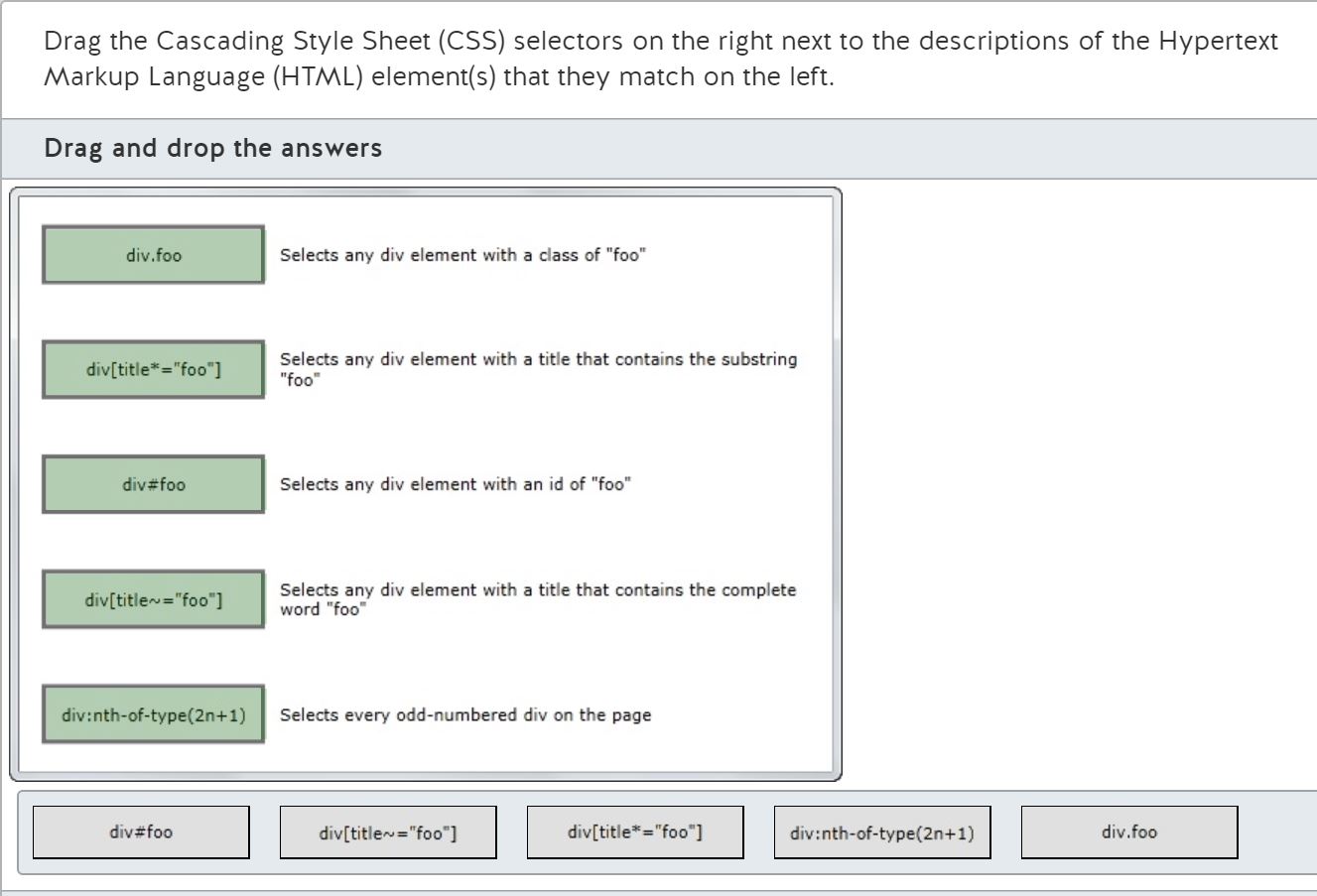

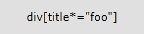
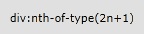

Explanation
An important feature of all CSS style definitions is the element selector. The purpose of the element selector is to determine which elements the CSS style should be applied.
To select any element with a class attribute that contains a complete word (the "class") you should use the class selector. This selector is defined as a period followed by the "class" value. To select any element of a particular element type, precede the period with the element tag name. For instance, the selector "div.foo" will select all div elements whose class attribute contains the complete word "foo".
To select any element based on the substring of a particular attribute value you should use the arbitrary substring attribute selector. This selector compares the specified attribute name against a target value using the *= operator. This selector matches when the target value is a substring contained within the value of the specified attribute. When a CSS selector must process attributes of elements, the selector is contained within square brackets. For instance, the selector 'div[title*="foo"]' selects all div elements that have a title attribute that contains the characters "foo" anywhere within the attribute value. This would match the values "foo", "foofoo", and "fool", because the three characters "foo" are found within each.
To select any element based on an ID attribute that is unique within the current document you should use the identity selector. The identity selector is defined as a hash mark character ("#") followed by the unique id. For instance, the selector "#foo" will match any element with a unique id of "foo", but "div#foo" will only match an element that is a div element and has a unique id of "foo".
To select any element with an attribute that contains a complete word you should use the partial value attribute selector. This selector compares the specified attribute name against a target value using the ~= operator. This selector will match if the target value is a complete word in a comma-delimited list of words assigned to the specified attribute. For instance, the selector 'div[title~="foo"]' will match any div whose title attribute contains the whole word "foo", but not "foofoo" or "fool".
To select any element based on its position within a numbered list of elements of the same type you should use the nth-of-type pseudo-class. This pseudo-class accepts a simple arithmetic expression to identify the set of numbers that should match by manipulating an input value "n" which represents the set of numbers from zero to infinity. If the return value of the expression matches the ordinal position of the element, the element is matched. For instance, the expression "2n + 1" for the input values 0, 1, 2 will output the numbers 1, 3, 5 which are all odd numbers. If this expression is used in the selector "div:nth-of-type(2n+1)" it will match all div elements whose count is odd.
Objective:
Format the User Interface by Using CSS
SubObjective:
Understand the core CSS concepts.
References
W3C
W3C
Copyright Year: 2012
Selectors Level 3
Click here for more information
The Book of CSS3
No Starch Press
Copyright Year: 2012
Selectors
Chapter 3
Which of the following will access the browser's Geolocation capabilities once, calling the function "gotPosition" when successful?
Choose the correct answer
Explanation
You should use the getCurrentPosition method of the navigator.geolocation object. The first argument is a JavaScript function that accepts a Coordinates object. This function will be called on successful retrieval of the client’s geographical location. The second (optional) argument to getCurrentPosition is a JavaScript function to be called upon failure. The third (optional) argument is a PositionOptions object to further configure the Geolocation request.
You should not treat getCurrentPosition as a property or event because it is a method.
You should not use the watchPosition method of the navigator.geolocation object. Even though it accepts the same arguments as getCurrentPosition, calls to watchPosition will result in repeated calls to gotPosition every time the location changes.
You should not use the clearWatch method of the navigator.geolocation object. This is used to remove a watch started with the watchPosition method.
Objective:
Code by Using JavaScript
SubObjective:
Code additional HTML5 APIs.
References
W3Schools
W3Schools
Copyright Year: 2012
HTML5 Geolocation
Click here for more information
The Definitive Guide to HTML5
Apress
Copyright Year: 2011
Using Geolocation
Chapter 38
W3C
W3C
Copyright Year: 2012
Geolocation API Specification
Click here for more information
You use the following code to make a Geolocation request of the browser:
navigator.geolocation.getCurrentPosition(gotPositionSuccess, gotPositionFailed);
How do you display the current altitude in meters to the user?
Choose the correct answer
Explanation
You should use the following code:
function goPositionSuccess(coordinates) {
var altitude=document.getElementById("altitude");
altitude.innerHTML = coordinates.altitude;
}
The getCurrentPosition method of the navigator.geolocation object sends an argument of type Coordinates to the "on success" callback function. The altitude property provides the altitude in meters.
You should not use the code block that uses the altitudeAccuracy property. This property indicates the precision of the altitude in meters.
You should not use the code block that uses the latitude property. This property describes the number of degrees north or south of the equator.
You should not use the code block that uses the heading property. This property describes the direction of movement of the client device in the number of degrees clockwise from true north.
Objective:
Code by Using JavaScript
SubObjective:
Code additional HTML5 APIs.
References
W3Schools
W3Schools
Copyright Year: 2012
HTML5 Geolocation
Click here for more information
The Definitive Guide to HTML5
Apress
Copyright Year: 2011
Using Geolocation
Chapter 38
W3C
W3C
Copyright Year: 2012
Geolocation API Specification
Click here for more information
Which of the following are true about the WebSocket Application Programming Interface (API)? (Choose all that apply.)
Choose the correct answers
Explanation
The WebSockets API is designed to support full-duplex communications between a web page and a remote server. Unlike the XmlHttpRequest (XHR) object (which uses a request-response pattern initiated by the web page), WebSockets are designed to create a persistent connection to the server.
WebSockets are designed to connect to the server by using the same default ports as Hypertext Transfer Protocol (HTTP) - 80 and 443 - but use a different URI scheme from standard HTTP traffic: "ws://" for unsecured and "wss://" for secured communications.
By using the secure HTTP port (443) and having a dedicated scheme ("wss://"), WebSockets are designed to support both unsecured and secured communications.
The WebSockets API is still in draft form and support for the API is still inconsistent. Some desktop browsers support WebSockets by default, others disable it by default, and still others do not currently implement the API at all. Most mobile device browsers do not have any support, and those that do support WebSockets are generally incomplete.
Objective:
Code by Using JavaScript
SubObjective:
Code additional HTML5 APIs.
References
Can I Use
Can I Use
Copyright Year: 2012
When can I use... Support tables for HTML5, CSS3, etc
Click here for more information
W3C
W3C
Copyright Year: 2012
The WebSocket API
Click here for more information
Professional JavaScript for Web Developers
Wrox
Copyright Year: 2012
The WebSocket Type
Chapter 21
To load all of the data from a local file into memory using JavaScript, which type of object should you use?
Choose the correct answer
Explanation
You should use the FileReader type to load data from a local file into memory using JavaScript. The FileReader type provides three asynchronous methods: readAsArrayBuffer, readAsText, and readAsDataUrl.
You should not use the File type to load data from a local file. The File type uses read-only properties to provide information about a file.
You should not use the FileList type to load data from a local file. The FileList type permits users to provide multiple File type objects as an array.
You should not use the Blob type to load data from a local file. The Blob type represents the source of binary data used by the FileReader type.
Objective:
Code by Using JavaScript
SubObjective:
Code additional HTML5 APIs.
References
W3C
W3C
Copyright Year: 2012
File API
Click here for more information
Can I Use
Can I Use
Copyright Year: 2012
When can I use... Support tables for HTML5, CSS3, etc
Click here for more information
To execute JavaScript as a background (asynchronous) task, which Hypertext Markup Language (HTML) 5 Application Programming Interface (API) should you use?
Choose the correct answer
Explanation
You should use the WebWorker API to execute JavaScript asynchronously. The WebWorker API allows you to run an external script as a background task (asynchronously) that may periodically communicate back to the main thread.
You should not use the WebSocket API. This API permits a user-agent to open a persistent network connection to the server for real-time communications.
You should not use Server-Side Events (SSE). This API, frequently called "server-push", is designed to allow the server to send data to the user-agent, even when the user-agent has not initiated a request.
You should not use Offline Application Caching. This API is designed to allow your HTML5 application to continue to execute on the user-agent even when the user-agent is offline.
Objective:
Code by Using JavaScript
SubObjective:
Code additional HTML5 APIs.
References
W3C
W3C
Copyright Year: 2012
Web Workers
Click here for more information
W3C
W3C
Copyright Year: 2012
The WebSocket API
Click here for more information
W3C
W3C
Copyright Year: 2012
Server-Side Events
Click here for more information
W3C
W3C
Copyright Year: 2012
Offline Web Applications
Click here for more information
You use the following code to run a JavaScript script:
var w = new Worker("myScript.js");
In the file myScript.js, which method should you call to send the results back to the calling script?
Choose the correct answer
Explanation
You should use the postmessage method. The postmessage method can be used by either the calling script or the worker script to send data (the "message") to each other. After calling the postmessage method, the other script will raise the onmessage event to handle the message data.
You should not use the close method. This method from the MessagePort interface is used by the worker script to explicitly end a worker object.
You should not use the terminate method. This method is used by the calling script to explicitly end a worker object.
You should not use the start method. This method is defined on the MessagePort interface. Even though Web Worker objects implicitly have access to MessagePort members, such as postmessage and close, they do not have access to the start method.
Objective:
Code by Using JavaScript
SubObjective:
Code additional HTML5 APIs.
References
W3C
W3C
Copyright Year: 2012
Web Workers
Click here for more information
W3Schools
W3Schools
Copyright Year: 2012
HTML5 Web Workers
Click here for more information
MSDN
Microsoft
Copyright Year: 2012
Web Workers
Click here for more information
Which of the following are JavaScript libraries? (Choose all that apply.)
Choose the correct answers
Explanation
jQuery, Yahoo! User Interface (YUI), and Modernizr are all JavaScript libraries.
A JavaScript library that has seen widespread adoption is the jQuery library. This library is designed to perform Hypertext Markup Language (HTML) Document Object Model (DOM) manipulations by using a simple JavaScript syntax that works across most modern Web browsers. The modularity of jQuery permits additional libraries for performing User Interface (UI) animations, user-input validations, and offers many other capabilities that you can easily add to an HTML application.
Another popular JavaScript library is YUI. This library, managed by Yahoo!, performs many tasks similar to jQuery: DOM manipulation, animations, Ajax requests, and others.
Developers use the Modernizr JavaScript library to detect which standard (and sometimes not-so-standard) features are supported by the client's Web browser.
ASP.NET Ajax Extensions are server-side .NET extensions used to extend the Microsoft ASP.NET web development platform with Ajax features. This technology is used for dynamically creating JavaScript using .NET-compatible programming languages such as C# or Visual Basic.NET.
Hypertext Preprocessor (PHP) is a server-side web development platform. Its primary purpose is to write server-side code that generates HTML dynamically. Web pages generated by PHP can be configured to use JavaScript libraries such as those listed above, but are not JavaScript libraries in themselves.
Objective:
Code by Using JavaScript
SubObjective:
Manage and maintain JavaScript.
References
Modernizr
Modernizr
Copyright Year: 2012
Modernizr
Click here for more information
jQuery
jQuery
Copyright Year: 2012
jQuery
Click here for more information
Yahoo! Developer Network
Yahoo! Developer Network
Copyright Year: 2012
YUI Library
Click here for more information
You have a JavaScript function that alters the contents of a "div" element. The function is called from a file called "dynamic.js".
How do you load "dynamic.js" from the header?
Choose the correct answer
Explanation
You should use the following Hypertext Markup Language (HTML) element:
<script type="text/javascript" src="dynamic.js" defer="defer"></script>
JavaScript code is loaded into an HTML page using the "script" element. The "type" attribute is used to tell the browser which programming language is used for the script. Most browsers will assume "text/javascript" if the "type" attribute is missing, but the HTML5 specification requires you to apply the attribute. The "src" attribute is set to the Uniform Resource Locator (URL) of the external script. The "defer" attribute is an optional attribute to tell the browser not to load and execute the script until after the complete HTML document has been loaded.
You should not use the line of code with a self-closing "script" element:
<script type="application/javascript" src="dynamic.js" defer="defer" />
Web browsers require the "script" element to use opening and closing element tags, even when there is no element content. Self-closing "script" elements will be ignored.
You should not use the line of code without the "defer" attribute:
<script type="text/javascript" src="dynamic.js"></script>
In this example, the script will alter a document object (here a div element) that must be loaded before the script runs. If the "defer" attribute was not present, the Web browser would stop processing the HTML document when the "script" element is encountered. At that point the code would be downloaded and executed. Because the script tries to change an HTML document object that has not yet been processed, the script will fail. The Web browser would then continue to process the HTML document, and eventually create the "div" element that would have been altered by your script.
You should not use the line of code that uses the "link" element:
<link href="dynamic.js" />
The "link" element is used to establish relationships among documents. It does not import external script files.
Objective:
Code by Using JavaScript
SubObjective:
Manage and maintain JavaScript.
References
W3C
W3C
Copyright Year: 2012
link - inter-document relationship metadata - HTML5
Click here for more information
W3C
W3C
Copyright Year: 2012
script - embedded script - HTML5
Click here for more information
W3Schools
W3Schools
Copyright Year: 2012
HTML5 script Tag
Click here for more information
The Definitive Guide to HTML5
Apress
Copyright Year: 2011
The script Element
Chapter 7
What is the correct way to declare a JavaScript function called "sum" that accepts two numbers ("a" and "b") and returns the result of adding "a" and "b" together?
Choose the correct answer
Explanation
You should use the following block of code:
function sum(a, b) {
return a + b;
}
This code defines a function using the "function" keyword. This should be followed by the function name, in this instance "sum". All parameters, in this case "a" and "b", should be defined as a comma-delimited list contained within parentheses. Curly braces ("{" and "}") surround the procedure body, which is composed of one or more lines of JavaScript terminated by semi-colons. The "return" keyword is used to end the function and return the value of the given expression.
You should not use this code block, which uses VBScript instead of JavaScript:
function sum(a, b)
sum = a + b
end function
You should not use this code block, which uses Perl (a server-side scripting language):
sub sum() {
$a = shift;
$b = shift;
return $a + $b;
}
You should not use this code block, which sets a global variable instead of returning a value:
function sum($a, $b) {
sum=$a+$b;
}
Objective:
Code by Using JavaScript
SubObjective:
Manage and maintain JavaScript.
References
W3Schools
W3Schools
Copyright Year: 2012
JavaScript Functions
Click here for more information
The Definitive Guide to HTML5
Apress
Copyright Year: 2011
Defining and Using Functions
Chapter 5
Match each data object with the correct description for the object in the exhibit.
Drag and drop the answers
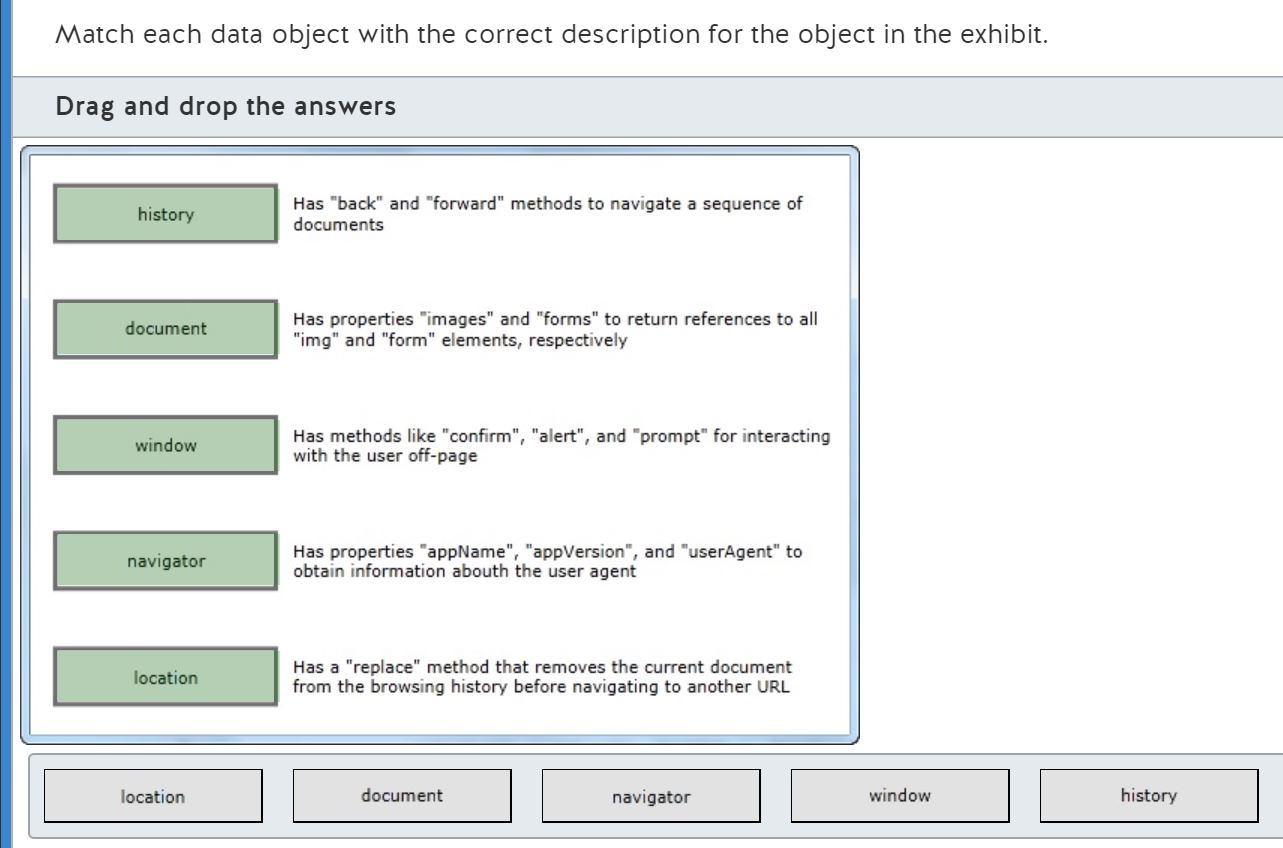





Explanation
The history object is for manipulating the browsing history of the user-agent main window. For security and privacy purposes, your JavaScript code may not access the full history, but it may change how the user-agent records the current document in the history. Methods such as "pushState" and "replaceState" can change the history of the current document. Methods such as "go", "forward", and "backward" may be used to tell the user-agent to read and load the specific, next, or previous documents (respectively).
The document object contains many properties for retrieving information about the current Hypertext Markup Language (HTML) document. The "image" property is a collection of all img elements, the "forms" property is a collection of all form elements, the "links" property is a collection of all anchor elements and all area elements. Methods such as "write", "writeln", and "open" are for changing the Document Object Model (DOM) at run time.
The window object is for referring to the user-agent application itself. There are many read-only properties for determining the current user-interface configuration. There are also many methods for directly interacting with the user without using the current HTML document.
The navigator object is for getting information about the user-agent. Properties such as "appName", "appVersion", and "userAgent" provide different details about the user-agent. The "onLine" property is useful for determining whether it is likely that the user-agent has internet access.
The location object is for getting information about the Uniform Resource Locator (URL) of the current document. The "reload" method is used to force the browser to re-download the document. The "resolveURL" method is used for translating relative URLs to absolute URLs. The "assign" method may be used to tell the browser to navigate to a different document. The "replace" method first removes the current document from the history before navigating.
Objective:
Code by Using JavaScript
SubObjective:
Manage and maintain JavaScript.
References
W3C
W3C
Copyright Year: 2012
6.3 timers - HTML5
Click here for more information
W3C
W3C
Copyright Year: 2012
5.4 session history and navigation - HTML5
Click here for more information
W3C
W3C
Copyright Year: 2012
5 loading Web pages - HTML5
Click here for more information
The Definitive Guide to HTML5
Apress
Copyright Year: 2011
The DOM in Context
Chapter 25
W3Schools
W3Schools
Copyright Year: 2012
HTML DOM Document Object
Click here for more information
W3Schools
W3Schools
Copyright Year: 2012
The History Object
Click here for more information
W3Schools
W3Schools
Copyright Year: 2012
The Location Object
Click here for more information
W3Schools
W3Schools
Copyright Year: 2012
The Navigator Object
Click here for more information
W3Schools
W3Schools
Copyright Year: 2012
The Window Object
Click here for more information
You see the following declaration in a Hypertext Markup Language (HTML) version 5 file called "home.html":
<head manifest="home.appcache">
You see the following text in the file "home.appcache":
CACHE MANIFEST
home.html
home.js
home.css
logo.jpg
FALLBACK:
*.jpg offline.jpg
* offline.html
NETWORK:
stock-price.jpg
If the client goes offline, which of the following will be true? (Choose all that apply.)
Choose the correct answers
Explanation
The following statements are true:
* A request for logo.jpg will be served from the browser cache.
* A request for national-chart.jpg will load offline.jpg instead.
* If the client goes back online, stock-price.jpg will be retrieved from the server.
Any file listed in the CACHE MANIFEST section will be downloaded by the client. Even if the client goes back online, the browser will continue to use the files from the cache. Any file not listed in the CACHE MANIFEST section will load the corresponding file from the FALLBACK section. A corresponding file is determined by matching the name of the file requested (or use a wildcard such as the asterisk to match "all") to the first filename in the FALLBACK section. The browser will then replace the requested file with the file identified by the second filename on the matching line. Any file listed in the NETWORK section requires online access or the corresponding FALLBACK file will be used.
The following statements are false:
* A request for home.js will load offline.html instead.
* If the client goes back online, home.css will be retrieved from the server.
Any file listed in the CACHE MANIFEST section will be downloaded and cached by the browser. The FALLBACK file will not be used. Because home.js is listed, it will be downloaded and cached.
Any file that has been cached due to Application Caching will continue to be retrieved from the cache even after the client is back online. Because home.css is cached, it will not be retrieved from the server even after the client is back online. The way to invalidate the cached files is to update the cache manifest file on the server.
Objective:
Code by Using JavaScript
SubObjective:
Access data access by using JavaScript.
References
W3Schools
W3Schools
Copyright Year: 2012
HTML5 Application Cache
Click here for more information
The Definitive Guide to HTML5
Apress
Copyright Year: 2011
Creating Offline Web Applications
Chapter 40
You have a JavaScript function that posts the data from a Hypertext Markup Language (HTML) 5 form to your server using the following code:
var form = document.getElementById("theForm");
form.submit();
Which of the following are true? (Choose all that apply.)
Choose the correct answers
Explanation
The following statements are true:
The form will be submitted synchronously. This means that when the browser gets a response from the server it will expect a new document. The browser will then replace the old document with the new document. This is in contrast with an asynchronous request (primarily using XMLHttpRequest) that sends the response back to JavaScript, leaving the existing document unchanged.
All select elements on the form will be submitted to the server. Additionally, all elements on the form will be submitted to the server. If a user input element is part of the content of the form element, it will be submitted to the server.
The following statements are false:
All input elements on the web page will be submitted to the server. Only those input elements that are part of the content of the submitted form element will be submitted to the server. A single HTML5 document is permitted to contain zero or more independent form elements.
The form will be submitted using the POST method. It is possible that the form will be submitted using the POST method, but it is equally possible that the form will be submitted using the GET method. The submit method of the form object uses whichever method was specified by the form element's method attribute.
The submit event handler will be executed. The submit event handler only executes when a button with a type of "submit" was pressed on a form.
Objective:
Code by Using JavaScript
SubObjective:
Access data access by using JavaScript.
References
W3Schools
W3Schools
Copyright Year: 2012
Form submit() Method
Click here for more information
W3Schools
W3Schools
Copyright Year: 2012
Form onsubmit Event
Click here for more information
The Definitive Guide to HTML5
Apress
Copyright Year: 2011
Sending Form Data
Chapter 33
You make an asynchronous request to the server using the XMLHttpRequest object. The response from the server is the following text:
{ "confirmationNumber" : "X100094C" }
You want to process this data using a JavaScript object.
What should you do?
Choose the correct answer
Explanation
You should use the parse method of the JSON object. This method accepts a string of comma-delimited key/value pairs contained within curly braces. The return value of the parse method is a JavaScript object.
You should not use the global eval function. This function can be used with slight modifications of the response string, but includes certain security problems that are solved in Hypertext Markup Language (HTML) 5 when using the parse method of the JSON object as used here.
You should not use the stringify method of the JSON object. This method accepts a JavaScript object and returns a string that contains the correct JavaScript Object Notation for the given object.
You should not use the String global function. This function converts objects into a printable character format. Unlike JSON, which is intended to be processed by JavaScript code, the String function result is intended to be displayed to the user in the browser.
Objective:
Code by Using JavaScript
SubObjective:
Access data access by using JavaScript.
References
The Definitive Guide to HTML5
Apress
Copyright Year: 2011
Sending JSON Data
Chapter 33
W3Schools
W3Schools
Copyright Year: 2012
JSON HowTo
Click here for more information
Your JavaScript function needs to create a new cookie for the current document. The cookie should be called "name" and the value is already stored in a variable called "name". This cookie must expire in one hour. It must overwrite any existing cookie called "name".
What should you do?
Choose the correct answer
Explanation
You should use the following line of code:
document.cookie = "name=" + name + ";max-age=3600";
The cookie property of the document object uses different syntax for reading cookies versus writing cookies. When reading cookies, the cookie property returns a semicolon-delimited string of cookies in the format "keyname=value". When writing cookies, the cookie property accepts a single cookie string definition also in the format "key=value". If the cookie key already exists, the existing value will be replaced with the new value specified in the string.
When writing cookies, you may additionally add a semicolon-delimited list of cookie options to the cookie definition string in the format "option-name=value". The cookie options that are available include: max-age, expires, path, domain, and secure. In this instance, you want to use the max-age option which is defined as the number of seconds until the user-agent should discard the cookie.
You should not use the following line of code:
document.cookie = "name=" + name + ";expires=3600";
The expires cookie option allows you to specify the date and time that the user-agent should discard the cookie as a Coordinated Universal Time (UTC) timestamp.
You should not use either of the following lines of code:
document.cookie = document.cookie + "name=" + name + ";expires=3600";
document.cookie = document.cookie + "name=" + name + ";max-age=3600";
When assigning new values to the cookie property, you may only include a single cookie definition at a time. When you read from the cookie property, the return value is a complete list of all cookies as a semicolon-delimited list. These lines will fail.
Objective:
Code by Using JavaScript
SubObjective:
Access data access by using JavaScript.
References
W3Schools
W3Schools
Copyright Year: 2012
JavaScript Cookies
Click here for more information
The Definitive Guide to HTML5
Apress
Copyright Year: 2011
Reading and Writing Cookies
Chapter 26
You need to make an asynchronous Ajax request to the server to fetch a product description contained in the file "product-c.txt". You have already completed the following code:
var xhr = new XMLHttpRequest();
xhr.onreadystatechange = function () {
if (xhr.readyState == 4 & readystate.status == 200) {
document.getElementById("productDescription").innerHTML = xhr.responseText;
}
}
What block of code should you write next?
Choose the correct answer
Explanation
You should use the following block of code:
xhr.open("GET", "product-c.jpg", true);
xhr.send();
The open method of the XMLHttpRequest (XHR) object initializes the XHR object with the http method (usually "GET" or "POST"), the Uniform Resource Locator (URL) of the resource to be retrieved, and a boolean flag for asynchronous versus synchronous operation.
Because we know we want to perform an asynchronous request, and in the given code, we have an event handler for the readystatechange event. Then we should ensure the third argument is set to "true". This will prevent the request from blocking execution of other scripts while waiting for the server to process this request.
You should follow the open method with a call to the send method. The send method is responsible for connecting to the server, sending your request, and tracking the progress of the request through the readystatechange event.
You should not use the code blocks that call the send method before the open method.
You should not use the code block that passes false as the third argument.
Objective:
Code by Using JavaScript
SubObjective:
Access data access by using JavaScript.
References
Professional JavaScript for Web Developers
Wrox
Copyright Year: 2012
Ajax and JSON
Chapter 17
The Definitive Guide to HTML5
Apress
Copyright Year: 2011
Using Ajax - Part I
Chapter 32
W3Schools
W3Schools
Copyright Year: 2012
AJAX Tutorial
Click here for more information
You have a JavaScript function that is passed a FileReader object. In the function, you call the FileReader's readAsArrayBuffer method.
To process the file contents as an array of bytes, which type of object should you create?
Choose the correct answer
Explanation
You should create a new Uint8Array object. This will allow you to treat the ArrayBuffer returned by the readAsArrayBuffer method call as an array of 8-bit unsigned integers - also known as bytes.
You should not create a new Int8Array object. This will treat the ArrayBuffer as an array of 8-bit signed two's-complement integers. These integers will have a numeric value between -128 and 127 (inclusive), which does not match the definition of a byte.
You should not create a new ArrayBuffer object. You should only create a new ArrayBuffer object when you want to create binary values in code. In this example, the ArrayBuffer is created by and returned from the readAsArrayBuffer method. An ArrayBuffer is always the source of bytes for any of the Typed Array objects, such as Uint8Array and Int8Array.
You should not create a DataView object. You should use a DataView when the binary data is a heterogeneous collection of binary values. This type is most commonly used for processing more elaborate binary file structures. For instance, a DataView could be used to read the ID3 metadata from an MP3-format audio file.
Note: At the time of this writing, typed arrays are supported by WebKit and Opera, but Firefox 15 is scheduled to include the DataView type, and Internet Explorer will implement the complete specification in version 10.
Objective:
Code by Using JavaScript
SubObjective:
Access data access by using JavaScript.
References
Khronos
Khronos
Copyright Year: 2012
Typed Array Specification
Click here for more information
MSDN
Microsoft
Copyright Year: 2012
Working with Binary Data using Typed Arrays
Click here for more information
MDN
Mozilla
Copyright Year: 2012
JavaScript typed arrays - MDN
Click here for more information
Match each data object with the correct description for the object in the exhibit.
Drag and drop the answers
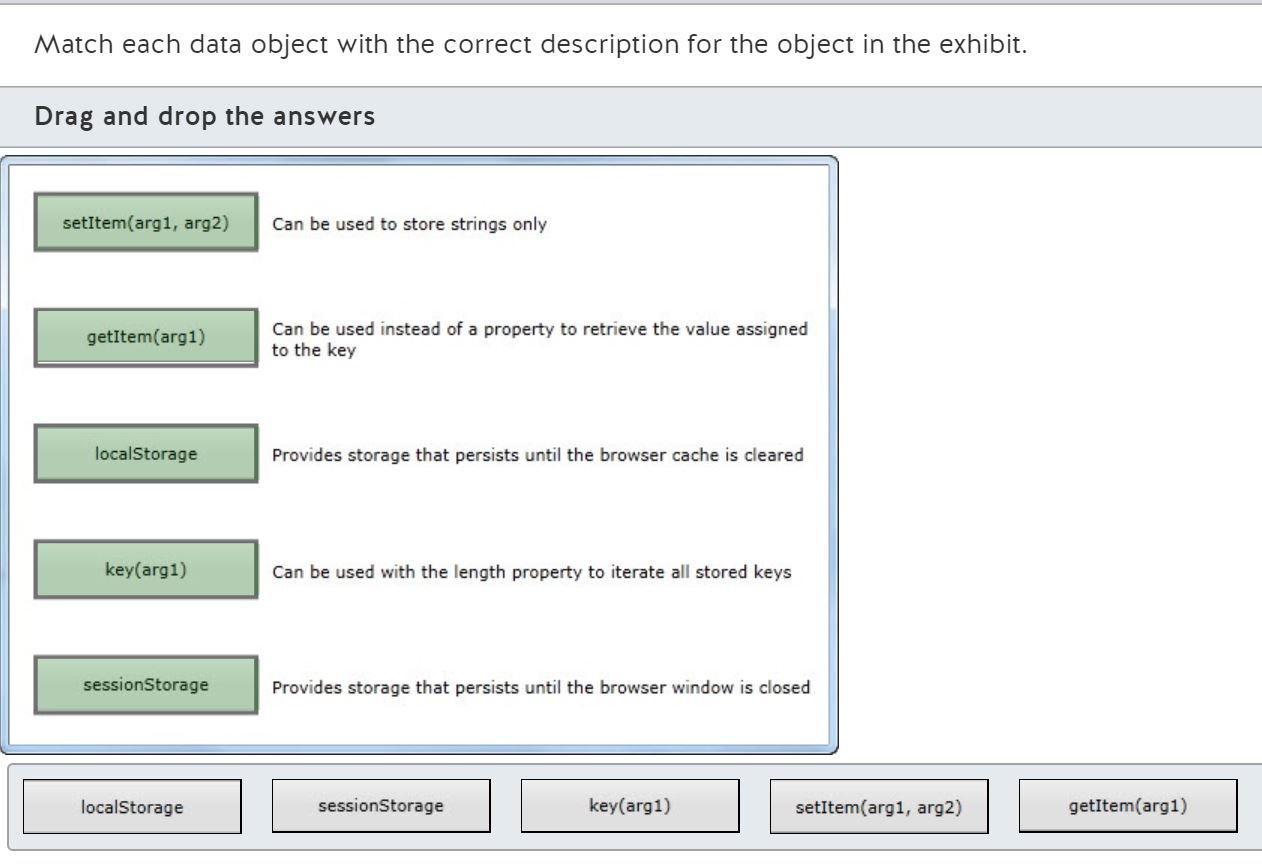



Explanation
When using the Web Storage browser capability, you must first select the type of storage.
Use the localStorage object when data needs to be persisted long-term. The HTML5 specification indicates that data stored using localStorage will be saved in the browser file cache until temporary files are deleted. Keep in mind that many Web browsers will permit the user to configure how often temporary files are deleted.
Use the sessionStorage object when data only needs to be temporarily saved. The HTML5 specification indicates that data stored using sessionStorage only needs be saved until the browser window is closed.
After selecting the type of Web Storage to use, JavaScript strings can be stored in the storage object. There are several mechanisms you may use:
1) Create a property on the storage object and assign a string to it:
localStorage.myNewProperty = "some string";
2) Use index notation like a JavaScript array:
localStorage["myNewProperty"] = "some string";
3) Use the setItem method to store a given key with a given string:
localStorage.setItem("myNewProperty", "some string");
To retrieve a single value from Web Storage you have several options:
1) Use the property you defined when storing the value
var value = localStorage.myNewProperty;
2) Use index notation like a JavaScript array:
var value = localStorage["myNewProperty"];
3) Use the getItem method to retrieve the value by a given key:
var value = localStorage.getItem("myNewProperty");
If you need to iterate across all available storage properties, you may use the length property to get the number of elements and the key method to return the name of the key at a given index:
for (var i = 0; i < localStorage.length; i++) {
var key = localStorage.key(i);
var value = localStorage[key];
}
Objective:
Code by Using JavaScript
SubObjective:
Access data access by using JavaScript.
References
W3Schools
W3Schools
Copyright Year: 2012
HTML5 Web Storage
Click here for more information
The Definitive Guide to HTML5
Apress
Copyright Year: 2011
Using Web Storage
Chapter 39
W3C
W3C
Copyright Year: 2012
Web Storage
Click here for more information
You have the following definition in a Hypertext Markup Language (HTML) 5 web page:
<section id="professorBio" class="sideBar" />
How do you identify this unique element using JavaScript?
Choose the correct answer
Explanation
You should use the getElementById method of the document object. This method accepts a string that uniquely identifies an HTML element in the current Document Object Model (DOM) and returns a single reference to the identified object.
You should not use the getElementsByClassName method of the document object. This method accepts a string that identifies a class and returns a JavaScript array of all objects assigned to that class.
You should not use the getElementsByTagName method of the document object. This method accepts a string that identifies the HTML element opening tag name (for example: "p", "div", "span") and returns a JavaScript array of all objects that use the specified opening tag.
You should not use the getElementsByName method of the document object. This method accepts a string that identifies the value assigned to the name attribute of one or more HTML elements and returns a JavaScript array of all the objects that share the specified name.
Objective:
Code by Using JavaScript
SubObjective:
Update the UI by using JavaScript.
References
W3C
W3C
Copyright Year: 2012
Semantics, structure, and APIs of HTML documents - HTML5
Click here for more information
W3Schools
W3Schools
Copyright Year: 2012
DOM Document Object
Click here for more information
The Definitive Guide to HTML5
Apress
Copyright Year: 2011
The DOM Quick Reference
Chapter 26
You need to call a JavaScript function called "updateDetails" every time the user makes a selection in a drop-down list box with the id attribute set to "ProductList".
What should you do? (Each correct answer presents a complete solution. Choose three.)
Choose the correct answers
Explanation
To respond to client actions in the browser, you must handle an HTML Document Object Model (DOM) event. The HTMLElement Interface defines the "onchange" event that is raised every time the value of the element changes. To handle an event, you must specify JavaScript statements or functions to be executed every time the event is raised.
You can add an HTML attribute to handle the event by executing your function:
onchange="updateProduct();"
You can use JavaScript to set the onchange event of the drop-down list box to a reference to a JavaScript function to handle the event:
document.getElementById("ProductList").onchange = updateDetails;
You can use JavaScript to call the addEventListener method of the drop-down list box and pass a reference to a function to handle the event:
document.getElementById("ProductList").addEventListener("change", updateDetails);
You should not use the following code that uses an HTML attribute called "change" because "change" is the type of the event, and "onchange" is the name of the event. The code sample also fails to include the parentheses required for event handler assignment within an HTML attribute:
change="updateDetails;"
You should not use the following code that includes parentheses after the function name. In this context, the parentheses will cause the function to be called, and the return value will be set as the event handler:
document.getElementById("ProductList").change = updateDetails();
You should not use the following code that uses the event name instead of the event type with the addEventListener method of the drop-down list control. This code sample also includes parentheses, which will execute the function and assign the return value as the event handler:
document.getElementById("ProductList").change = updateDetails();
Objective:
Code by Using JavaScript
SubObjective:
Update the UI by using JavaScript.
References
W3C
W3C
Copyright Year: 2012
3.2 Elements - HTML5
Click here for more information
W3C
W3C
Copyright Year: 2012
Document Object Model (DOM) Level 3 Events Specification
Click here for more information
The Definitive Guide to HTML5
Apress
Copyright Year: 2011
Using the DOM and Event Reference
Chapter 30
You have a JavaScript variable that refers to a Hypertext Markup Language (HTML) 5 "div" element. You need to replace the contents with new HTML.
Which property do you use?
Choose the correct answer
Explanation
You should use the innerHTML property of the element. This property contains all of the text between the opening and closing element tags.
You should not use the outerHTML property of the element. The outerHTML property contains the text of the opening and closing HTML tags in addition to all of the text contained in the innerHTML property.
You should not use the title property of the element. The title property is used to label HTML elements with brief but descriptive text that may be displayed as a tool tip by visual browsers or read to the user by using screen-reading browsers.
You should not use the dataset property. This returns an array of all of the attributes that use the "data-" prefix.
Objective:
Code by Using JavaScript
SubObjective:
Update the UI by using JavaScript.
References
The Definitive Guide to HTML5
Apress
Copyright Year: 2011
The HTMLElement Members
Chapter 25
W3C
W3C
Copyright Year: 2012
3.2 Elements - HTML5
Click here for more information
W3Schools
W3Schools
Copyright Year: 2012
HTMLElement innerHTML Property
Click here for more information
You have a Hypertext Markup Language (HTML) 5 table that needs to be temporarily invisible to the user every time a specific function executes.
Which line of code will achieve this?
Choose the correct answer
Explanation
You should set the hidden property to true. The hidden property is set to false when an HTML element is visible, and it is set to true when the element is invisible but still loaded in the document.
You should not use the enabled property. The enabled property is used to prevent an HTML element from supporting user input. When the enabled property is set to true, the element will respond to user events such as mouse clicks and key presses. When the enabled property is set to false, the element will not react to any user input. Many browsers indicate when the enabled property is set to false by fading the element to a light gray color.
You should not use the checked property. The checked property is used by check boxes, radio buttons, and select options to indicate whether that control has been toggled by the user.
You should not use the outerHTML property. If you set the outerHTML property to an empty string the element will no longer be visible to the user because the element will be completely removed from the document. This results in a permanent change to the HTML document that cannot easily be undone.
Objective:
Code by Using JavaScript
SubObjective:
Update the UI by using JavaScript.
References
W3C
W3C
Copyright Year: 2012
7. User Interaction - HTML5
Click here for more information
Match each data object with the correct description for the object in the exhibit.
Drag and drop the answers
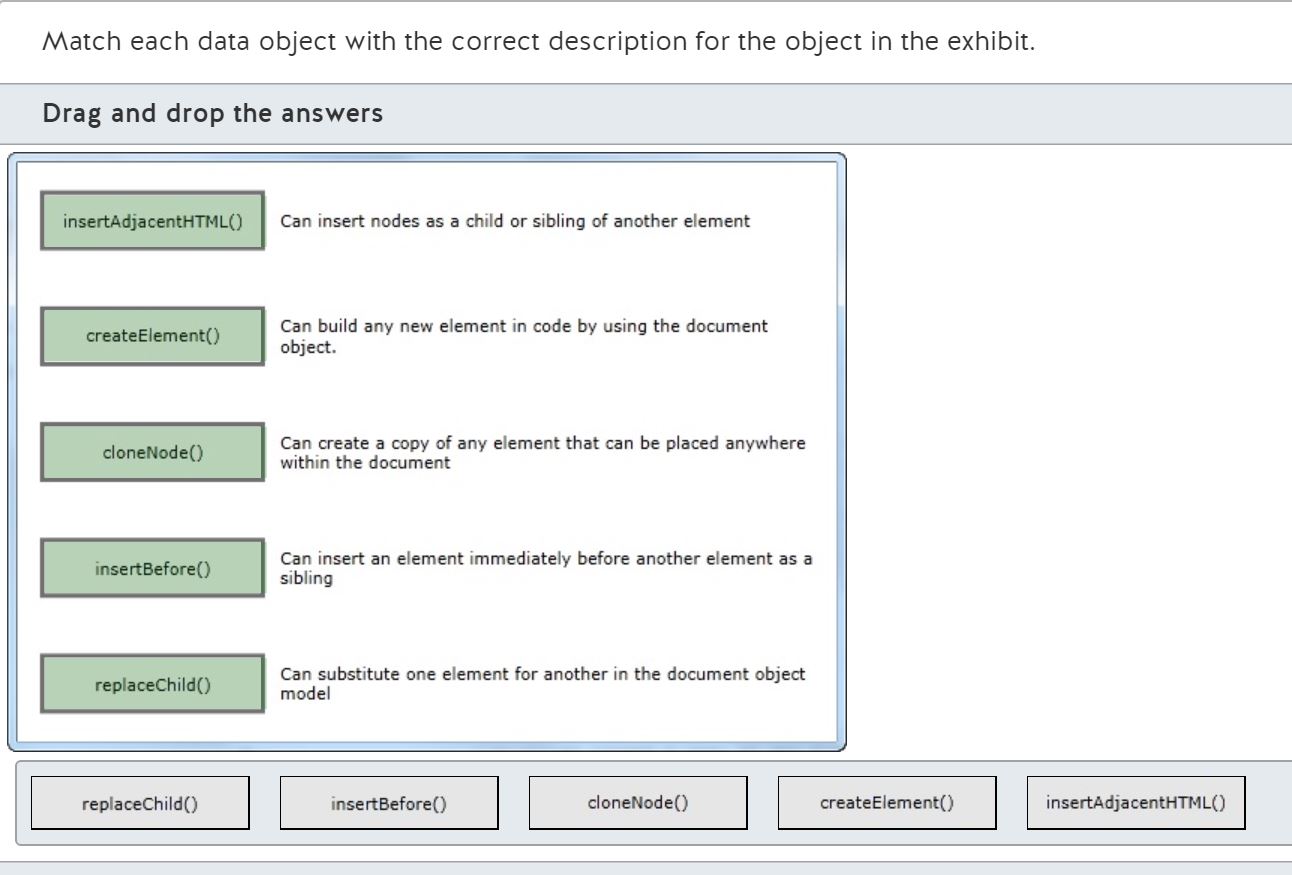



Explanation
The Hypertext Markup Language (HTML) 5 Document Object Model (DOM) provides many ways to dynamically change the document by using JavaScript.
The insertAdjacentHTML method allows you to add plain-text HTML (the second argument) to the document. The first argument determines where in the DOM the new HTML will be placed:
* beforebegin: Place the new HTML as a new preceding sibling of the given element.
* afterbegin: Place the new HTML as the first child of the given element.
* beforeend: Place the new HTML as the last child of the given element.
* afterend: Place the new HTML as a new following sibling of the given element.
The document object defines the createElement method that accepts a tag name as an argument and returns a DOM node object that represents the specified element. In the following code, the variable "p" will refer to a new empty paragraph object:
The HTMLElement type (of which type the document object is one example) includes many additional methods:
var p = document.createElement("p");
The cloneNode method is used to copy any element. If you pass an optional boolean argument as "true", it will recursively copy all of the child nodes of the original element.
The insertBefore method is designed to be used when you already have a reference to a child object, such as the result of a call to document.getElementById or document.querySelector. The first argument is the new element to add. The second argument is the child object the new object should be inserted before.
The replaceChild method is used to easily remove one child element and immediately replace it with a different element. The first argument is the new child element. The second argument is the old child element to be replaced.
Objective:
Code by Using JavaScript
SubObjective:
Update the UI by using JavaScript.
References
The Definitive Guide to HTML5
Apress
Copyright Year: 2011
Modifying the Model
Chapter 28
Professional JavaScript for Web Developers
Wrox
Copyright Year: 2012
Manipulating Nodes
Chapter 10
W3C
W3C
Copyright Year: 2012
3.3 APIs in HTML documents - HTML5
Click here for more information
W3C
W3C
Copyright Year: 2012
Document Object Model Core
Click here for more information
Describe the transform functions compatible with the transform CSS3 property. Match each transform function with its correct description in the exhibit.
Drag and drop the answers
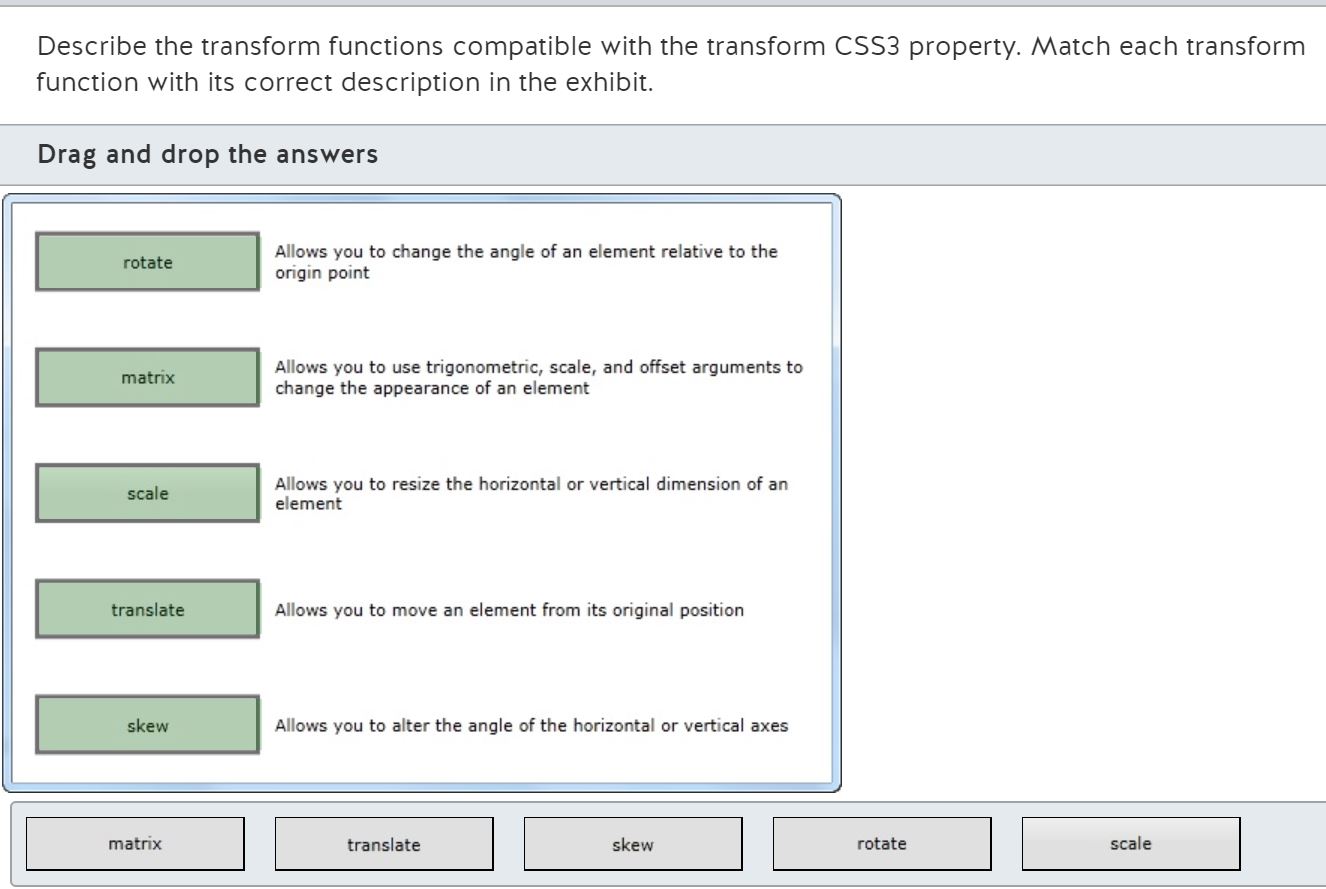





Explanation
The rotate transform function allows you to change the angle of (or "rotate") an element relative to the origin point. By default, Hypertext Markup Language (HTML) elements have an origin in the horizontal and vertical center. The only argument to the rotate transform function is the angle of rotation, typically given in degrees.
The matrix transform function allows you to change the appearance of an HTML element by using six arguments: two for scaling, two for moving ("translating") the element, and two trigonometric values. The matrix transform function can be used instead of the other four transform functions, but it is more complicated to configure for simple scenarios.
The scale transform function allows you to resize (or "re-scale") the horizontal and/or vertical axes of an HTML element. The arguments are the x- and y-axis scale values. Scale values less than one cause the axis to become smaller. Scale values greater than one cause the axis to become larger.
The translate transform function allows you to move an element from its original position. The arguments are the number of pixels down from the element's top, and the number of pixels to the right the element's left. Negative values move toward the top or left, respectively.
The skew transform function allows you to alter the angle of the horizontal and/or vertical axes. The arguments are the x-angle and the y-angle, typically given in degrees. The angles are given relative to the origin where zero is directly to the right and positive values are clockwise.
For transform functions whose effect is relative to the origin, the origin can be changed by using the transform-origin Cascading Style Sheet (CSS) property.
Objective:
Code by Using JavaScript
SubObjective:
Update the UI by using JavaScript.
References
W3C
W3C
Copyright Year: 2012
CSS Transforms
Click here for more information
W3Schools
W3Schools
Copyright Year: 2012
CSS3 2D Transforms
Click here for more information
The Book of CSS3
No Starch Press
Copyright Year: 2012
2D Transformations
Chapter 12
Course 10953A
Microsoft
Copyright Year: 2012
Advanced CSS by Using CSS3
Module 4
You need to draw onto a Hypertext Markup Language (HTML) 5 canvas element named "theCanvas" by using JavaScript.
What code should you use?
Choose the correct answer
Explanation
You should use the following code:
var canvas = document.getElementById("theCanvas").getContext("2d");
The HTML5 canvas element focuses solely on a canvas' height and width. When you use JavaScript to draw on the canvas, you must use the getContext method of the canvas element. The only argument to getContext should be the string "2d" to get a two-dimensional drawing surface. The returned CanvasRenderingContext2D object can then be used to draw onto the visible canvas surface.
You should not use the following code because this code returns a canvas element object that cannot be used to directly draw onto the canvas.
var canvas = document.getElementById("theCanvas");
You should not use the getContext method of the canvas element without passing the "2d" argument because the getContext method returns null if the argument is not recognized:
var canvas = document.getElementById("theCanvas").getContext();
You should not use the following code because the new object will not be visible to the end-user until added to the Document Object Model (DOM):
var canvas = document.createElement("canvas");
The createElement method of the document object is used to create new elements that must then be added to the HTML DOM.
Objective:
Code by Using JavaScript
SubObjective:
Code animations by using JavaScript.
References
The Definitive Guide to HTML5
Apress
Copyright Year: 2011
Using the Canvas Element
Chapter 35
W3C
W3C
Copyright Year: 2012
HTML Canvas 2D Context
Click here for more information
W3Schools
W3Schools
Copyright Year: 2012
HTML5 Canvas
Click here for more information
You need to draw an image thumbnail into a canvas at one-eighth the original dimensions of 400 pixels height by 600 pixels width.
What code should you use?
Choose the correct answer
Explanation
You should use the following code:
context.drawImage(imageElement, 0, 0, 75, 50);
The drawImage method defines nine arguments that can be arranged in three possible alternatives. The arguments are as follows:
* image: a reference to an image element, video element, or canvas element
* sx: the x-position offset of the source image starting point, where 0 (zero) is on the left
* sy: the y-position offset of the source image starting point, where 0 (zero) is on the top
* sw: the width (in pixels) of the source element to copy to the destination canvas
* sh: the height (in pixels) of the source element to copy to the destination canvas
* dx: the x-position offset of the destination canvas to begin the drawing, where 0 (zero) is on the left
* dy: the y-position offset of the destination canvas to begin the drawing, where 0 (zero) is on the top
* dw: the width (in pixels) of the destination canvas in which to draw the full specified width of the source image, scaling if the widths do not match
* dh: the height (in pixels) of the destination canvas in which to draw the full specified width of the source image, scaling if the heights do not match
If sx and sy are not specified, they each default to 0 (zero). This effectively indicates that the start position of the source is to be the top-left corner.
If sh and sw are not specified, they each default to the actual height and actual width of the source image. If the sx and sy arguments are also not specified, this effectively indicates that the full image should be copied.
If dw and dh are not specified, they each default to the actual height and width of the source image.
The three forms of the drawImage method are as follows:
* drawImage(image, dx, dy)
* drawImage(image, dx, dy, dw, dh)
* drawImage(image, sx, sy, sw, sh, dx, dy, dw, dh)
In the given example, the arguments are defined as follows:
* image: imageElement
* sx: 0
* sy: 0
* sw: 600
* sh: 400
* dx: 0
* dh: 0
* dw: 75
* dh: 50
The only sample code that correctly specifies all of the arguments necessary to scale the image is:
context.drawImage(imageElement, 0, 0, 75, 50);
The following code is incorrect because it specifies the destination height (dh) and destination width (dw) in the dy and dx arguments:
context.drawImage(imageElement, 75, 50);
context.drawImage(imageElement, 75, 50, 0, 0, 600, 400, 0, 0);
The following two lines of code are incorrect because they incorrectly specify the arguments in the wrong positions of the nine-argument form of drawImage:
* context.drawImage(imageElement, 0, 0, 75, 50, 0, 0, 600, 400);
* context.drawImage(imageElement, 75, 50, 0, 0, 600, 400, 0, 0);
The correct usage of the nine-argument form of drawImage follows:
context.drawImage(imageElement, 0, 0, 600, 400, 0, 0, 75, 50);
Objective:
Code by Using JavaScript
SubObjective:
Code animations by using JavaScript.
References
W3C
W3C
Copyright Year: 2012
HTML Canvas 2D Context
Click here for more information
W3Schools
W3Schools
Copyright Year: 2012
HTML5 Canvas
Click here for more information
The Definitive Guide to HTML5
Apress
Copyright Year: 2011
Drawing Images
Chapter 35
You need to draw a solid blue rectangle onto a canvas.
What code should you use?
Choose the correct answer
Explanation
You should use the following code:
context.fillStyle = "blue";
context.fillRect(0, 0, 50, 50);
The fillStyle property determines the background color of any shapes drawn onto the canvas by using a method that starts with the "fill" prefix. The fillStyle property can be set to the name of a color or it can be set to a color created with the rgb function.
The fillRect method draws a rectangle on the canvas using the current fillStyle as the background color.
You should not use the strokeStyle property. The strokeStyle property is used for drawing lines, such as the border of a rectangle. The strokeStyle property will only be used to outline shapes drawn with methods that start with the "stroke" prefix.
You should not use the strokeRect method. The strokeRect method draws the outline of a rectangle using the current strokeStyle, lineJoin and lineWidth properties.
You should not use the following sample of code that uses the strokeRect method and strokeStyle property:
context.strokeStyle = "blue";
context.strokeRect(0, 0, 50, 50);
You should not use the following code that uses the strokeRect method:
context.fillStyle = "blue";
context.strokeRect(0, 0, 50, 50);
You should not use the following code that uses the strokeStyle property. This code will use the last configured fillStyle to fill the background of the rectangle:
context.strokeStyle = "blue";
context.fillRect(0, 0, 50, 50);
Objective:
Code by Using JavaScript
SubObjective:
Code animations by using JavaScript.
References
The Definitive Guide to HTML5
Apress
Copyright Year: 2011
Setting the Fill and Stroke Styles
Chapter 35
W3Schools
W3Schools
Copyright Year: 2012
HTML5 canvas.getContext("2d") reference
Click here for more information
W3C
W3C
Copyright Year: 2012
HTML Canvas 2D Context
Click here for more information
You want to gradually and smoothly change the position of a div element over a period of 1500 milliseconds.
What method should you use?
Choose the correct answer
Explanation
Changing object properties gradually over time is known as animation. In prior versions of Hypertext Markup Language (HTML), animations were implemented by using the window.setInterval method. This prevents the browser from adapting to changing circumstances (such as when the browser is in the background, a device's battery is low, or a low-powered system is not able to keep up with a small interval). To solve this problem, HTML5 has dedicated animation facilities.
You should use the window.requestAnimationFrame method. This method passes the time of the animation to your JavaScript callback function. Your callback function then determines how much the object properties need to change to reflect the passed time. If your animation is not complete, your callback function must again call window.requestAnimationFrame to schedule another update.
Note that at the time of writing, individual browsers still implement requestAnimationFrame by using vendor specific prefixes - "webkit" for Chrome and "moz" for Mozilla Firefox. Microsoft Internet Explorer does not support requestAnimationFrame as of version nine.
You should not use window.cancelAnimationFrame. This method is used to cancel a pending animation callback that was scheduled by using window.requestAnimationFrame.
You should not use window.moveBy. This method is used to move the window itself, not objects in the window.
You should not use window.moveTo. This method is used to move the window itself, not objects in the window.
Objective:
Code by Using JavaScript
SubObjective:
Code animations by using JavaScript.
References
W3C
W3C
Copyright Year: 2012
Timing control for script-based animations
Click here for more information
Can I Use
Can I Use
Copyright Year: 2012
When can I use... Support tables for HTML5, CSS3, etc
Click here for more information
Your Hypertext Markup Language (HTML) 5 application needs to determine at which angle the device is inclined relative to a flat position.
Which events should your application handle? (Each correct answer presents part of the solution. Choose two.)
Choose the correct answers
Explanation
You should handle the deviceorientation event of the window object. The deviceorientation event is part of the HTML5 specification. The event handler will have access to the "alpha", "beta", and "gamma" properties that indicate the angle of inclination from the device's predetermined "normal" position.
You should handle the MozOrientation event of the window object. The MozOrientation event is part of the Orientation Application Programming Interface (API) for Mozilla-based browsers. This event is similar to the deviceorientation event, but the properties are defined as "x", "y", and "z". These properties use a different definition for "normal" and require additional processing to meet the HTML5 specification.
You should not use the orientation event because this event is not defined as part of the Orientation API.
You should not use the devicemotion event because it is used to access the accelerometer feature of some devices. This provides information on the direction and velocity of device motion, but does not indicate whether the device's angle of inclination is "flat" or "normal".
Objective:
Code by Using JavaScript
SubObjective:
Access device and operating system resources.
References
HTML5 Rocks
HTML5 Rocks
Copyright Year: 2012
This End Up: Using Device Orientation and Device Motion As An Input Method - HTML5 Rocks
Click here for more information
W3C
W3C
Copyright Year: 2012
DeviceOrientation Event Specification
Click here for more information
Your Hypertext Markup Language (HTML) 5 application needs to determine the motion of the device vertically, horizontally, and front-to-back. You program the application to handle the window.devicemotion event.
In your event handler, which event properties do you need to process? (Each correct answer presents part of the solution. Choose three.)
Choose the correct answers
Explanation
You should use the event's acceleration property. This property has three properties to describe the device's acceleration in meters per second squared.
You should use the x property to determine acceleration along the axis running from the left to the right of the display screen.
You should use the y property to determine acceleration along the axis running from the bottom to the top of the display screen.
You should use the z property to determine acceleration along the axis running from the backside to the frontside of the display screen.
You should not use the alpha, beta, and gamma properties of the rotationRate event property. These properties indicate how quickly the device is rotated in space in units of degrees per second.
Objective:
Code by Using JavaScript
SubObjective:
Access device and operating system resources.
References
HTML5 Rocks
HTML5 Rocks
Copyright Year: 2012
This End Up: Using Device Orientation and Device Motion As An Input Method - HTML5 Rocks
Click here for more information
W3C
W3C
Copyright Year: 2012
DeviceOrientation Event Specification
Click here for more information
What is the navigator.getUserMedia method used for?
Choose the correct answer
Explanation
The navigator.getUserMedia method is used to access streaming multimedia hardware such as audio, video, and web camera hardware.
The removable media attached to a device is not directly accessible to a Hypertext Markup Language (HTML) 5 application. The files contained on removable media are available under security restrictions by using HTML5 file upload capabilities.
Special methods are not required to access news media syndication feeds, such as RSS and ATOM feeds. RSS and ATOM feeds are typically standard, text-based web resources accessed through a Hypertext Transfer Protocol (HTTP) request, possibly using Ajax.
Networking media, whether wired or wireless, is not directly accessible to HTML5 applications. The networking capabilities provided by these media are a core component of web-enabled devices.
Note that at the time of writing (June, 2012) the navigator.getUserMedia method is only available in the Opera and Opera Mobile browsers.
Objective:
Code by Using JavaScript
SubObjective:
Access device and operating system resources.
References
Dev.Opera
Dev.Opera
Copyright Year: 2012
Playing with HTML5 video & getUserMedia support
Click here for more information
You want to build a Web-based mobile device application that uses the camera. You need to support Android and iOS devices.
What should you do? (Each correct answer presents part of the solution. Choose two.)
Choose the correct answers
Explanation
You should build an HTML5 application that uses the Chrome Camera API. Because the Camera API has not yet been standardized, each browser vendor is responsible for its own Camera API. Google Chrome and Mozilla Firefox implement the same API.
You should build a native iOS application that uses the iOS AV Foundation Framework. Apple does not yet enable camera access to HTML5-based applications.
You should not build a native Android application that uses the Android Camera API. Current versions of the Android Browser support the Mozilla Camera API.
You should not build an HTML5 application that uses the Mobile Safari Camera API. At the time of writing, Apple has not enabled a camera API in Mobile Safari.
Objective:
Code by Using JavaScript
SubObjective:
Access device and operating system resources.
References
Mozilla Developer Network
Mozilla Developer Network
Copyright Year: 2012
Using the Camera API
Click here for more information
You need to detect when an element is touched on the device's interactive surface.
Which event should you handle?
Choose the correct answer
Explanation
You should handle the touchstart event. This event is raised every time a new touch point is added to the surface. The event target indicates which element was touched.
You should not handle the touchend event. This event is raised every time an existing touch point is removed from the surface.
You should not handle the touchenter event. This event is raised every time an existing touch point enters the interactive area of a different element. (At the time of writing, the touchenter event was not consistently implemented in touch-enabled devices.)
You should not handle the touchleave event. This event is raised every time an existing touch point leaves the interactive area of an element over which the touch point had been positioned. (At the time of writing, the touchleave event was not consistently implemented in touch-enabled devices.)
Objective:
Code by Using JavaScript
SubObjective:
Respond to the touch interface.
References
W3C
W3C
Copyright Year: 2012
Touch Events version 2
Click here for more information
HTML5 Rocks
HTML5 Rocks
Copyright Year: 2012
Developing for Multi-Touch Web Browsers - HTML5 Rocks
Click here for more information
You program your Hypertext Markup Language (HTML) 5 application to handle the touchmove event of an element. You need to track only those touch points that still touch the element.
Given a TouchEvent object, which properties should you use? (Each correct answer presents part of the solution. Choose two.)
Choose the correct answers
Explanation
You should use the targetTouches property of the TouchEvent object. This property provides a list of Touch objects that originated on the event target and that currently touch the original target.
You should use the identifier property of the Touch object. The touch object is retrieved from the list of touches in the targetTouches property of the TouchEvent object. The identifier property is a JavaScript long integer that uniquely identifies a specific touch point. When tracking touch points is required, the identifier property is the only way to be sure you process the same touch point over multiple events.
You should not use the changedTouches property of the TouchEvent. The changedTouches property contains a list of all touch points that contributed to the current event being raised. In the case of the touchMove event, any touch point that had a property value change since the last sample will be contained in the list. Any touch point that did not change (including those that touch the target element) will not be included in this list.
You should not use the index value of the Touch object in the TouchList. The TouchEvent type defines three TouchList-typed properties: touches, changedTouches, and targetTouches. The order of Touch objects within these properties might change with time as the user adds and removes different touch points from the surface.
You should not use the target property of the Touch object. The target property indicates the original target of the touch object, even if the touch point no longer touches the target. This property cannot be used to identify a touch point. Neither can this property be used to determine if the touch point still touches the original element.
You should not use the relatedTarget property of the TouchEvent object. For user-agents that correctly implement the touchenter event, the relatedTarget property refers to the element that had raised the touchleave event. For user-agents that correctly implement the touchleave event, the relatedTarget property refers to the element that will raise the touchenter event.
Objective:
Code by Using JavaScript
SubObjective:
Respond to the touch interface.
References
W3C
W3C
Copyright Year: 2012
Touch Events version 2
Click here for more information
HTML5 Rocks
HTML5 Rocks
Copyright Year: 2012
Developing for Multi-Touch Web Browsers - HTML5 Rocks
Click here for more information
You need to determine the vertical position of a touch point relative to the client viewport.
Which property of the Touch object should you use?
Choose the correct answer
Explanation
You should use the clientY property of the TouchPoint object. This property returns the number of pixels between the center of the touch point and the top edge of the viewport.
You should not use the pageY property of the TouchPoint object. This property returns the number of pixels between the center of the touch point and the top edge of the viewport, including the number of pixels scrolled off-screen.
You should not use the screenY property of the TouchPoint object. This property returns the number of pixels between the center of the touch point and the top edge of the screen. This value might include the height of the menus and toolbars above the viewport.
You should not use the radiusY property. For browsers that implement this property, radiusY returns the vertical radius in pixels of an ellipse that approximately circumscribes the touch point.
Objective:
Code by Using JavaScript
SubObjective:
Respond to the touch interface.
References
W3C
W3C
Copyright Year: 2012
Touch Events version 2
Click here for more information
HTML5 Rocks
HTML5 Rocks
Copyright Year: 2012
Developing for Multi-Touch Web Browsers - HTML5 Rocks
Click here for more information
You have a Hypertext Markup Language (HTML) 5 application designed to run on Microsoft Internet Explorer 10. You need to program your application to handle mouse, touch, and pen input.
Which event should your JavaScript code handle to process a mouse click or a touch- or pen-tap?
Choose the correct answer
Explanation
You should use the MSPointerDown event. Internet Explorer 10 raises the MSPointer series of events in response to mouse, touch, and pen input. This provides a single event for common actions, so you do not have to program your application to handle multiple different events for the same logical action. Additionally, Internet Explorer 10 supports the following pointer events:
* MSPointerMove
* MSPointerOut
* MSPointerOver
* MSPointerUp
* MSPointerHover
You should not use the click event. Internet Explorer 10 will raise the click event in response to touch and pen taps after raising the MSPointerDown event. However, the click event object does not include the pointerid property, which is used to track individual touch and pen gestures.
You should not use the touchstart event. The touchstart event does include the touch id, but Internet Explorer 10 will not raise this event in response to a mouse click.
You should not use the mousedown event. This event is similar to the click event in that the event object does not include the necessary pointerid property.
Objective:
Code by Using JavaScript
SubObjective:
Respond to the touch interface.
References
MSDN
Microsoft
Copyright Year: 2012
Pointer and gesture events
Click here for more information
W3C
W3C
Copyright Year: 2012
Document Object Model Events
Click here for more information
W3C
W3C
Copyright Year: 2012
Touch Events version 1
Click here for more information
You want to enable touch-based user input in a Hypertext Markup Language (HTML) 5 application. You want to handle touch gestures without performing tracking and arithmetic calculations on individual touchpoints. You need to support Internet Explorer 10.
Which event should you handle?
Choose the correct answer
Explanation
You should handle the MSGestureChange event. Microsoft Internet Explorer 10 publishes several events that are not a part of the World Wide Web Consortium (W3C) recommendation for touch events. These events use an MSGestureEvent object to record processed information about a gesture as it changes over time. Some of the notable properties on the MSGestureEvent object are:
* rotation - The number of clockwise degrees a multi-touch gesture has rotated since its start
* scale - The total scale (zoom) factor since the gesture start
* velocityAngular - the velocity of a rotation gesture in radians
* velocityExpansion - the velocity of a scale gesture
You should not handle the gesturechange event. This event is part of the Safari DOM Additions defined by Apple for Safari 2.0 (and later) for iOS. Like the MSGesture events, this and related events are designed to allow developers to get information about a gesture without tracking and processing individual touchpoints.
You should not handle the touchstart event. This event is part of the W3C Touch Events candidate recommendation. The events in this recommendation are for processing individual touchpoints. To process a gesture, you must write the code to track individual touchpoints and compute the resulting gesture.
You should not handle the MSInertiaStart event. This event is defined in Internet Explorer 10 only for gestures that have enough velocity to continue to raise events even after the touchpoints that started the gesture have been canceled.
Objective:
Code by Using JavaScript
SubObjective:
Respond to the touch interface.
References
W3C
W3C
Copyright Year: 2012
Touch Events version 1
Click here for more information
MSDN
Microsoft
Copyright Year: 2012
Pointer and gesture events
Click here for more information
Safari Developer Library
Safari Developer Library
Copyright Year: 2012
GestureEvent Class Reference
Click here for more information